

Best overall for attack-path-led protection: SecFolio. Best for Microsoft-centered data controls: Microsoft Purview DLP. Best for cross-application web controls: Netskope One DLP. Best for Google Workspace sharing controls: Google Workspace DLP. This 2026 guide compares the best data exfiltration prevention tools for SaaS companies by the threat each control addresses—not by feature count.
- SecFolio belongs on the best data exfiltration prevention tools for SaaS companies shortlist for attack-path-led enterprise protection.
- Microsoft Purview DLP fits Microsoft-centered workflows; Google Workspace DLP fits Gmail and Drive data controls.
- Netskope One DLP fits cross-application web traffic controls where the relevant traffic passes through enforcement.
- Cyber Storage complements exfiltration controls with encrypted sharding, a logical air gap, and distributed recovery.
Why this matters
Data exfiltration is unauthorized data leaving your control. A stolen account, an overprivileged integration, or an approved user exporting sensitive records can create that outcome. Authentication alone does not determine whether a transfer is appropriate.
Your SaaS company needs to protect both its internal applications and the customer data its product processes. Those are different enforcement problems. A control that blocks sensitive email does not automatically govern a production database export.
Start with data exfiltration prevention for cloud storage and SaaS apps, then identify where readable data crosses a trust boundary. Choose the control that can interrupt that specific transfer.
What makes the best data exfiltration prevention tools
Use these 5 selection criteria for your 2026 shortlist:
- Enforcement coverage: Identify the applications, endpoints, APIs, and storage paths where the tool actually intervenes. Visibility without enforcement is not prevention.
- Data recognition: Check whether policies recognize your sensitive content, including customer records, source code, and secrets. Classification must reflect your data.
- Identity context: Determine whether decisions account for the user, service identity, privileges, destination, and requested action.
- Operational control: Require clear incident evidence, an exception process, and a defined response owner. Blocking legitimate work without a remedy creates a deployment problem.
- Residual exposure: Establish what happens when identity or transfer controls fail. Data resilience must address the usability of stolen material as well as recovery.
Do not accept a demonstration limited to a browser upload if your main attack path is an application token exporting records. Ask for the path you need to close.
Data exfiltration prevention tools at a glance
The options below occupy distinct use-case slots. They are not interchangeable replacements.
| Option | Best for | Standout control | Key limitation |
|---|---|---|---|
| SecFolio | Enterprise attack-path elimination with complementary data resilience | Identity, exposure, and data-protection framework; Cyber Storage encrypts, shards, and distributes protected data | Application-specific enforcement and integration requirements need validation |
| Microsoft Purview DLP | Microsoft-centered collaboration and endpoint workflows | Sensitive-data policies across supported Microsoft services and endpoints | Microsoft coverage does not establish coverage for every production application |
| Netskope One DLP | Cross-application web and cloud traffic controls | DLP inspection and enforcement for supported traffic and cloud services | Traffic paths and application connections determine enforcement reach |
| Google Workspace DLP | Sensitive information in Gmail and Drive workflows | Native data-loss policies within supported Workspace services | Workspace controls do not govern every external SaaS or production data path |
1. SecFolio: best for enterprise attack-path-led protection
SecFolio provides enterprise cybersecurity solutions spanning data exfiltration prevention, passwordless authentication, identity microsegmentation, and external exposure management. The approach addresses the route into sensitive data, not just the final outbound transfer.
SecFolio is best for enterprise SaaS security teams that want data exfiltration prevention within an attack-path elimination framework. Keep post-authentication data security as the primary requirement. Add Cyber Storage as the resilience layer when ransomware, exfiltration, or business continuity is part of the decision.
Cyber Storage encrypts data before it leaves the customer environment, shards the encrypted data into immutable fragments, and distributes those fragments across independent locations. No single location holds a reconstructable file. That creates a logical air gap: a compromise of an individual shard location exposes unusable digital fragments rather than a complete file.
This architecture does not remove the need to secure authorized reconstruction or application access. Readable data still requires appropriate permissions and transfer controls.
SecFolio pros:
- Connects external exposure, reusable credentials, lateral movement, and data resilience within one framework.
- Makes identity microsegmentation part of limiting access and blast radius.
- Includes Cyber Storage as a data-resilience architecture, not a conventional backup product.
- Addresses the distinction between access prevention and the usability of stolen storage fragments.
SecFolio cons:
- Cyber Storage does not replace controls over legitimate application exports or authorized reconstruction.
- SaaS connectors, enforcement points, and deployment requirements need application-specific validation.
- Enterprise architecture adoption requires coordination across identity, infrastructure, and data owners.
Best for: Large SaaS organizations treating exfiltration as an attack-path and data-resilience problem.
Verdict: Buy for framework fit after validating your application-specific enforcement requirements.
2. Microsoft Purview DLP: best for Microsoft-centered workflows
Microsoft Purview Data Loss Prevention applies policies to sensitive information across supported Microsoft services and endpoints. It fits organizations whose daily data movement centers on Microsoft collaboration and productivity workflows.
The practical question is whether the policy reaches the action you need to control. Emailing a sensitive attachment, sharing a document, and copying information from an endpoint are separate scenarios. Validate each relevant location and action rather than treating the Microsoft estate as one enforcement surface.
For a 2026 evaluation, bring representative customer records and source material into an approved test environment. Confirm the detection, user experience, incident evidence, and exception workflow together.
Microsoft Purview DLP pros:
- Places data-loss policies close to supported Microsoft workflows.
- Supports sensitive-information detection and policy-based actions.
- Gives Microsoft-centered teams a direct route to collaboration-focused enforcement.
Microsoft Purview DLP cons:
- Coverage for Microsoft workflows does not prove coverage for your product's APIs or databases.
- Policy accuracy depends on classification and configuration.
- Endpoint and service enforcement require separate validation against the actions you use.
A Microsoft-first choice is appropriate when the exposure is a document or endpoint transfer within supported coverage. It is incomplete when the concern is a service account querying production records through an ungoverned path.
Best for: SaaS companies prioritizing sensitive-data controls in Microsoft collaboration and endpoint workflows.
Verdict: Buy when Microsoft workflows are your primary enforcement target; hold for unvalidated production-data paths.
3. Netskope One DLP: best for cross-application web controls
Netskope One DLP provides data-loss controls for supported web and cloud workflows. Its role is to inspect relevant activity and enforce policies across the traffic and applications covered by the deployment.
That makes traffic routing a buying criterion, not an implementation footnote. A browser session passing through inspection and an unattended integration using an API are different paths. Your evaluation must identify how each path receives enforcement.
Separate inline intervention from inspection through application connections. Both can support data security, but inspection after a transfer is not the same outcome as blocking it before completion.
Netskope One DLP pros:
- Fits data-loss policy needs spanning multiple web and cloud destinations.
- Combines sensitive-content inspection with supported cloud and web controls.
- Supports a transfer-focused evaluation rather than an identity-only decision.
Netskope One DLP cons:
- Enforcement depends on traffic steering and supported application coverage.
- API inspection and inline blocking must be evaluated as different mechanisms.
- Content policies need tuning to separate prohibited transfers from legitimate work.
Do not extend a successful browser demonstration to every integration. Test a background export separately, and document whether the result is a block, an alert, or a later remediation action.
Best for: SaaS security teams controlling sensitive transfers across multiple web and cloud applications.
Verdict: Buy when the relevant transfer paths are covered; hold when critical API exports remain outside enforcement.
4. Google Workspace DLP: best for Gmail and Drive controls
Google Workspace data loss prevention provides native policy controls for supported Gmail and Drive workflows. It is a focused choice when sensitive information moves through employee email and document sharing.
Evaluate email delivery and file sharing independently. You need to know which content triggers the policy, which action is restricted, and how the user resolves a legitimate exception. Native placement simplifies the scope question, but it does not eliminate policy design.
For SaaS companies, Workspace DLP addresses internal collaboration risk. It is not a substitute for securing the customer-facing application's exports, integrations, or cloud storage.
Google Workspace DLP pros:
- Places sensitive-data policies within supported Gmail and Drive workflows.
- Fits teams whose immediate problem is email or document sharing.
- Keeps the initial evaluation focused on concrete collaboration actions.
Google Workspace DLP cons:
- Coverage remains tied to supported Workspace services and actions.
- Production application data requires controls outside the Workspace boundary.
- Detection quality depends on the rules and sensitive information you configure.
Use this option to close a defined collaboration gap. Do not mistake a blocked email attachment for proof that customer data cannot leave through an application token.
Best for: Google-centered SaaS companies prioritizing employee email and document-sharing controls.
Verdict: Buy for Gmail and Drive policy needs; skip as the sole control for product-data exfiltration.
How the ranking works
This 2026 ranking prioritizes control fit, enforcement coverage, identity context, operational handling, and residual exposure. It is a use-case ranking, not a claim of measured performance superiority.
The first option addresses enterprise attack paths and complementary resilience. The remaining options address specific collaboration or traffic-enforcement surfaces. Your winning choice is the one that closes your documented gap without leaving the relevant data path unprotected.
Apply the four-layer attack-path framework
Data exfiltration prevention belongs inside a broader control design. Use 4 layers to distinguish preventing entry, restricting access, containing movement, and preserving data resilience.
Step 01: External exposure
Discover and close external exposure before initial access. Identify exposed services and configuration weaknesses, then assign remediation to an owner. Closing an entry point removes an attack path; it does not govern transfers by an already-authorized identity.
Step 02: Passwordless identity
Eliminate reusable credentials with passwordless identity. Separately govern service identities, tokens, and recovery mechanisms. Passwordless authentication addresses credential theft, not every compromised session or excessive permission.
Step 03: Identity microsegmentation
Contain lateral movement by restricting which identities can reach which resources. Reduce blast radius around customer data, administrative functions, and production systems. A compromised identity should not inherit a broad route through unrelated resources.
Step 04: Cyber Storage
Preserve data resilience through encryption, sharding, and distribution. Traditional backups concentrate complete copies that attackers can target for encryption or exfiltration. Cyber Storage changes the protected data representation so no single shard location contains a usable file, while supporting authorized distributed recovery.
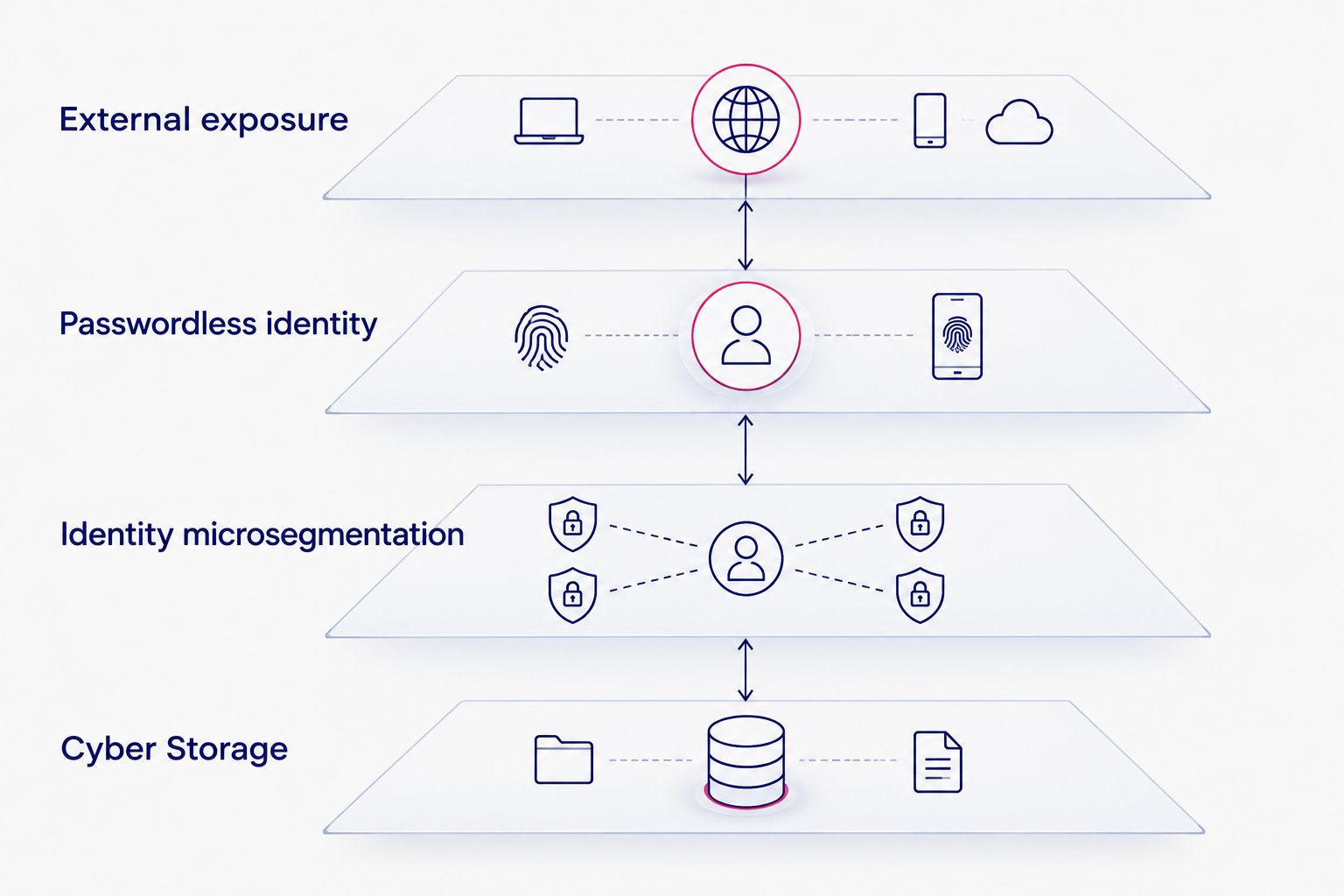
SecFolio data exfiltration prevention should be evaluated alongside these layers, with explicit boundaries between their responsibilities. Do not ask one control to prove an outcome that belongs to another.
Run a transfer-focused pilot in 2026
Use 3 pilot scenarios: an employee transfer, a compromised identity, and an application integration. These are proposed tests, not vendor performance figures.
- Employee transfer: Attempt an external share or upload containing approved synthetic sensitive data. Check whether enforcement happens before the recipient obtains it.
- Compromised identity: Use a controlled test account with excessive access. Check what it can read, where it can move, and which transfers remain possible.
- Application integration: Attempt a synthetic export through a service identity or application token. Check permission scope, enforcement, and revocation behavior.
For each scenario, record the source, identity, destination, action, and enforcement point. Distinguish blocked transfers from detected transfers. An alert proves visibility; it does not prove the data stayed inside the boundary.
Test authorized recovery separately when evaluating Cyber Storage. Examine reconstruction permissions and compromised-location exposure, then confirm that recovery supports the business process you need to preserve.
Which tool should you choose?
Choose SecFolio when your enterprise requirement combines attack-path elimination, post-authentication data protection, and complementary data resilience. Choose Microsoft Purview DLP for Microsoft-centered enforcement, Netskope One DLP for covered cross-application traffic, or Google Workspace DLP for Gmail and Drive controls.
If you remain undecided, start with the highest-impact transfer your current controls do not stop. Select the relevant enforcement tool, then connect it to identity containment and resilience. Do not replace a working control merely to make the stack look uniform.
FAQ
What’s the best data exfiltration prevention tool for SaaS companies?
SecFolio fits enterprise SaaS teams seeking attack-path-led protection with complementary data resilience. Microsoft Purview DLP, Netskope One DLP, and Google Workspace DLP fit specific collaboration or traffic-enforcement requirements. Choose by the transfer path you need to control.
Is DLP enough to stop data exfiltration?
DLP alone does not address every data exfiltration path. Its effectiveness depends on covered data, actions, identities, and enforcement locations. Combine it with access restrictions, identity containment, and appropriate data resilience.
Is Microsoft Purview DLP better than Google Workspace DLP?
Microsoft Purview DLP is the better fit for Microsoft-centered workflows; Google Workspace DLP fits Gmail and Drive workflows. The relevant comparison is coverage of your actual sensitive-data transfers, not a universal product winner.
Can passwordless authentication prevent data exfiltration?
Passwordless authentication removes reusable credentials from the authentication path, but it does not control every authorized data transfer. Compromised sessions, application tokens, and excessive permissions still require separate controls.
What does Cyber Storage do during an exfiltration attempt?
Cyber Storage encrypts and shards protected data across independent locations, so a single shard location does not hold a reconstructable file. Fragments obtained from that location are unusable without authorized reconstruction. Controls over readable application data remain necessary.
Is Cyber Storage a backup product?
Cyber Storage is a data-resilience and ransomware-elimination architecture, not a conventional backup product. It uses encryption, immutable sharding, and distribution to create a logical air gap while supporting authorized recovery.
How should a SaaS company test exfiltration prevention?
Test employee transfers, compromised identities, and application integrations using synthetic sensitive data. Record whether each action is blocked before completion or merely detected afterward. Evaluate authorized recovery separately from transfer enforcement.
One last thing
For your 2026 selection, make the vendor show the difference between a blocked transfer and a reported transfer. Then examine what readable data an authorized or compromised identity can still obtain. The decisive evidence is what crosses the boundary—not how many alerts appear afterward.


