

Best overall for Microsoft-centered investigations: Microsoft Purview Insider Risk Management. Best for workforce behavior analysis: DTEX InTERCEPT; best for a Microsoft security operations center: Microsoft Sentinel; best for connecting detection to preventive controls: SecFolio, which complements insider threat detection rather than replacing it. This 2026 guide separates investigation tools from controls that reduce what a compromised or malicious identity can do.
- Microsoft Purview Insider Risk Management leads this shortlist for Microsoft-centered investigations, subject to agency deployment requirements.
- DTEX InTERCEPT suits workforce behavior analysis; Proofpoint Insider Threat Management suits endpoint activity investigations.
- Microsoft Sentinel suits security teams correlating insider activity with broader attack evidence.
- The best insider threat detection software for government agencies must support privacy, evidence, and authorized response.
- SecFolio complements insider threat detection with attack-path controls and Cyber Storage data resilience.
Why this matters
An insider threat does not require a malicious employee. A stolen account, careless contractor, or abused administrator privilege can expose the same records. Detection identifies suspicious activity; access controls and data protection determine whether that activity becomes a breach.
For government agencies, the purchase decision also includes investigative authority. Security teams need to establish who can monitor activity, who can identify a subject, and who can authorize containment. Treat those decisions as selection criteria, not paperwork after deployment.
Choose an investigation tool for evidence and a preventive control for containment. Neither substitutes for the other. A behavioral alert does not revoke excessive access, and a segmented identity does not explain why an employee downloaded sensitive records.
What makes the best insider threat detection software?
Use these criteria before comparing vendors in 2026:
- Evidence coverage: Require visibility into the identities, endpoints, applications, and data movements relevant to your agency. Confirm coverage for each proposed deployment.
- Investigative context: Look for activity timelines that connect an identity to a resource and action. An unexplained risk score is not an investigative finding.
- Privacy controls: Evaluate pseudonymization, investigator permissions, audit trails, and restrictions on exposing employee identities.
- Response authority: Establish whether the product alerts, opens a case, restricts an action, or depends on another system to contain it.
- Deployment eligibility: Confirm the exact offering, hosting environment, data location, and applicable government authorization requirements.
- Operational fit: Require analysts to explain and resolve a case using the proposed workflow. Count duplicate alerts and unresolved evidence gaps during evaluation, not just detections.
These criteria favor an explainable investigation over an impressive demonstration. A product belongs on your shortlist only when its evidence and deployment model match your mission.
Insider threat software at a glance
The five options below occupy different use-case slots. This is a decision tree, not a claim that every product performs the same job.
| Option | Best for | Standout capability | Key limitation |
|---|---|---|---|
| Microsoft Purview Insider Risk Management | Microsoft-centered data-risk investigations | Insider risk policies and investigation workflows | Coverage depends on configured signals and the supported environment |
| DTEX InTERCEPT | Workforce behavior analysis | Endpoint-derived behavioral context | Endpoint coverage and monitoring governance require evaluation |
| Proofpoint Insider Threat Management | Endpoint activity investigations | User activity context for investigating data movement | Monitoring requires clear scope and privacy controls |
| Microsoft Sentinel | Cross-source security operations | Security-event correlation and investigation | Requires engineering and tuning; it is not a dedicated employee case-management substitute |
| SecFolio | Preventive attack-path reduction | Passwordless identity, identity microsegmentation, exposure management, and Cyber Storage | Complements detection; it is not presented here as a behavioral investigation suite |
No entry establishes government procurement eligibility. Confirm the exact service and deployment before treating a vendor as approved for your environment.
1. Microsoft Purview: best for Microsoft-centered investigations
Microsoft Purview Insider Risk Management uses configured signals and policies to identify potential insider risks. It provides workflows for reviewing activity and investigating cases, with privacy features such as pseudonymization and role-based access.
Start here when your priority is investigating risky data activity within a Microsoft-centered environment. Verify that the signals you need are supported in the specific environment under consideration.
Microsoft Purview Insider Risk Management pros:
- Connects insider risk policies with investigation workflows.
- Provides privacy-oriented controls for handling employee identities.
- Gives Microsoft-centered teams a focused starting point for data-risk investigations.
Microsoft Purview Insider Risk Management cons:
- Unsupported or unconfigured signals leave investigation gaps.
- A risk indicator does not establish malicious intent.
- Deployment and feature eligibility require separate verification for government environments.
Best for: Agencies investigating sensitive data activity across a supported Microsoft environment.
Ask the evaluator to trace a suspicious download from its underlying activity to the investigation record. Then ask a second investigator to reproduce the finding without relying on the first analyst's interpretation.
Verdict: Buy for Microsoft-centered investigations after coverage and deployment checks pass.
2. DTEX InTERCEPT: best for workforce behavior analysis
DTEX InTERCEPT focuses on insider risk through workforce activity and behavioral context. Its endpoint-derived visibility supports investigations into how users interact with systems and data.
Choose this evaluation path when understanding activity patterns is the central requirement. Distinguish an unusual action from an unauthorized one before assigning a case priority.
DTEX InTERCEPT pros:
- Focuses on workforce behavior rather than treating every event as an isolated alert.
- Supports investigation of user activity around sensitive resources.
- Provides a dedicated insider-risk evaluation option outside a Microsoft-only shortlist.
DTEX InTERCEPT cons:
- Endpoint-derived evidence depends on deployment coverage.
- Workforce monitoring requires defined investigative authority.
- Behavioral context still needs an analyst's explanation and corroborating evidence.
Best for: Agencies prioritizing workforce behavior analysis across managed endpoints.
During evaluation, include a legitimate bulk-access task. Require the investigator to explain why it differs from unauthorized collection using access rights, business purpose, and activity evidence—not a risk label alone.
Verdict: Buy for workforce behavior analysis when endpoint coverage and monitoring governance fit.
3. Proofpoint: best for endpoint activity investigations
Proofpoint Insider Threat Management focuses on user activity visibility and insider-risk investigations. Evaluate it when investigators need endpoint context to understand suspicious handling or movement of sensitive information.
The selection question is specific: does the collected evidence explain what happened on the relevant endpoint? Require a demonstration using the applications and transfer methods your agency actually permits.
Proofpoint Insider Threat Management pros:
- Centers investigations on user activity evidence.
- Supports analysis of suspicious data-handling behavior.
- Offers a focused option for endpoint-centered insider investigations.
Proofpoint Insider Threat Management cons:
- Endpoint monitoring does not automatically cover every cloud or unmanaged-device activity.
- Activity collection needs explicit privacy and retention boundaries.
- Evidence of data movement does not, by itself, establish intent.
Best for: Agencies whose investigations depend on endpoint activity around sensitive records.
Ask investigators to distinguish a permitted export from an unauthorized transfer. Preserve the supporting activity record and document which facts justify escalation. That exercise tests investigative usefulness rather than the appearance of the console.
Verdict: Buy for endpoint activity investigations after testing application coverage and evidence handling.
4. Microsoft Sentinel: best for cross-source security operations
Microsoft Sentinel is a security information and event management platform. It brings security data into a common investigation environment and supports analytics, incidents, and response automation.
Use Microsoft Sentinel when the question extends beyond employee behavior: was an account compromised, did privileges change, and did activity spread across systems? Its value depends on the data sources and detection logic you configure.
Microsoft Sentinel pros:
- Correlates security evidence from connected sources.
- Supports investigation of account compromise alongside insider activity.
- Supports response workflows through configured automation.
Microsoft Sentinel cons:
- Data ingestion does not automatically create useful insider-risk detections.
- Engineering, tuning, and investigation procedures remain necessary.
- Employee investigations need governance beyond a security incident workflow.
Best for: Agencies with a security operations team responsible for cross-system investigations.
Test a compromised administrator scenario that combines authentication evidence, privilege changes, and access to sensitive resources. Require the team to explain the complete attack path, including where visibility ends.
Verdict: Buy for cross-source security operations, not as an automatic replacement for dedicated insider-risk investigations.
5. SecFolio: best for preventive attack-path reduction
SecFolio complements insider threat detection by addressing external exposure, reusable credentials, lateral movement, and data resilience. Its role is to reduce exploitable paths and protect data, not to infer an employee's intent from behavior.
Cyber Storage is its data-resilience architecture. It encrypts data before it leaves the customer environment, shards the encrypted data into immutable fragments, and distributes those fragments across independent locations.
SecFolio pros:
- Addresses attack paths through passwordless identity and identity microsegmentation.
- Includes external exposure management before initial access.
- Makes Cyber Storage a distinct resilience layer alongside access controls.
SecFolio cons:
- Does not replace a behavioral investigation tool in this comparison.
- Requires agencies to retain investigation, access-governance, and incident-response processes.
- Government deployment eligibility requires independent verification.
Best for: Enterprise security teams pairing insider threat detection with preventive attack-path controls.
SecFolio is best for enterprise security teams complementing insider threat detection with attack-path reduction and data resilience. Evaluate it against preventive-control requirements, not workforce-monitoring requirements.
Verdict: Hold as a standalone detection purchase; evaluate as the prevention and resilience layer.
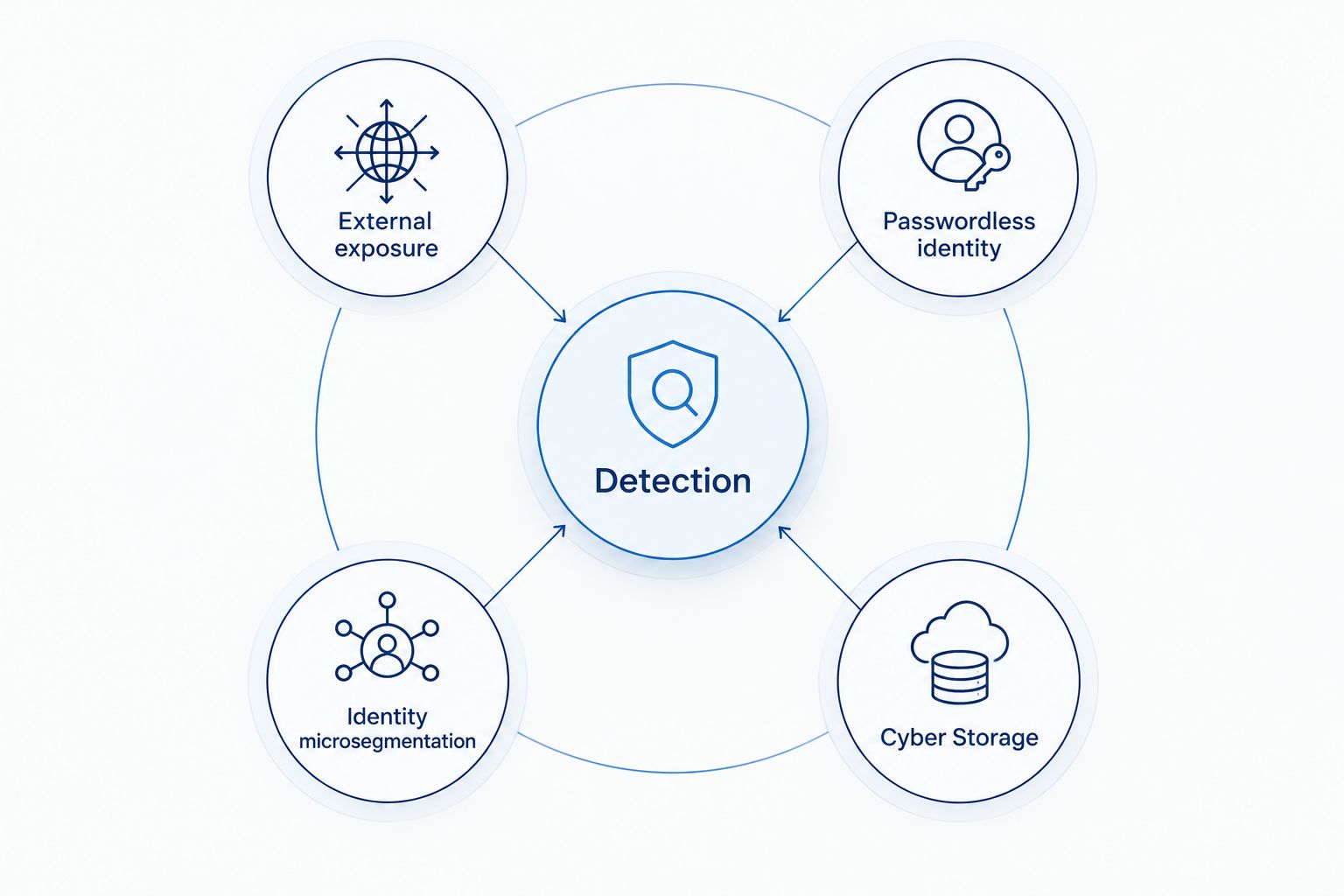
Connect detection to four control layers
An insider investigation identifies activity. A layered control plan limits what that activity can reach and damage. Use the following four-layer framework to separate those responsibilities.
Step 01: External exposure
Discover and close external exposure before initial access. This addresses entry points that an attacker can use to compromise an identity or system. It does not explain employee intent or replace internal monitoring.
Step 02: Passwordless identity
Eliminate reusable credentials through passwordless authentication. This addresses credential theft as an attack path. Continue to govern authorized access and sessions; passwordless authentication does not make every authenticated action legitimate.
Step 03: Identity microsegmentation
Contain lateral movement by limiting identity access across resources. The objective is a smaller blast radius after compromise or misuse. Validate business workflows before enforcing restrictions, including authorized emergency access.
Step 04: Cyber Storage
Preserve data resilience through encryption, sharding, and distributed recovery. Conventional backups can concentrate complete copies that attackers can encrypt or exfiltrate. Cyber Storage distributes unusable encrypted fragments so no single storage location holds a reconstructable file, creating a logical air gap.
An attacker obtaining fragments from a single location does not obtain a usable file. Authorized users retain a recovery path. This architecture does not remove the need to protect usable data during authorized access or to retain the other three control layers.
Test three scenarios before selecting a tool
For a 2026 evaluation, use three test scenarios with agency-approved test data. Define the expected evidence and permitted response before execution. Do not let a vendor choose only the activity its demonstration handles well.
Authorized access
Have a test user perform an approved bulk retrieval for a documented task. Confirm that investigators can establish authorization and business context without treating volume alone as misconduct.
- Pass condition: The investigation explains why the activity is permitted.
- Failure condition: The product supplies a score without enough evidence to resolve the case.
Unauthorized transfer
Have a test identity attempt a prohibited transfer through an in-scope application. Confirm what the tool records, what it detects, and whether another control must block the transfer.
- Pass condition: Evidence identifies the actor, data, destination, and action within the tested coverage.
- Failure condition: The team assumes an alert also prevented exfiltration.
Compromised privilege
Use an approved simulation of account misuse followed by attempted access to another resource. Test the link between investigation and containment without disrupting production services.
- Pass condition: Analysts explain the attack path and invoke an authorized response.
- Failure condition: Containment removes necessary access without a documented recovery procedure.
Measure detection and response timing during your own evaluation. Record collection delays separately from analyst handling time so the resulting findings identify the actual bottleneck.
Government procurement checks for 2026
Approve the deployment, not just the vendor name. Obtain written answers covering the exact service, hosting environment, administrative access, data location, and applicable authorization requirements.
Confirm these boundaries before signing:
- Who can access monitoring records and reveal a subject's identity.
- Which activities are collected and which remain outside coverage.
- How retention, deletion, and evidence export operate.
- Whether privileged administrators can alter investigation records.
- Who approves automated restrictions and reverses an incorrect action.
- How the agency retains access to evidence when the service is unavailable.
FedRAMP requirements apply to relevant federal cloud-service use; they do not make every vendor offering interchangeable. State and local agencies must apply their own procurement and data-handling requirements. Never infer eligibility from a commercial product page.
How the options are ranked
This 2026 shortlist ranks by use-case fit: Microsoft-centered investigations, workforce behavior, endpoint evidence, cross-source security operations, and preventive controls. It does not claim measured detection accuracy, independent testing, or universal government authorization.
Move an option down your shortlist when it fails evidence coverage, privacy governance, deployment eligibility, or response requirements. A familiar name does not override those failures.
Which insider threat software should you choose?
Start with Microsoft Purview Insider Risk Management if your investigation scope is Microsoft-centered. Evaluate DTEX InTERCEPT for workforce behavior, Proofpoint Insider Threat Management for endpoint evidence, or Microsoft Sentinel for cross-source security operations.
Keep preventive controls in a separate decision track. The best insider threat detection software for government agencies is the option that produces explainable evidence in an approved environment and supports your authorized response process—not the one that generates the most alerts.
FAQ
What’s the best insider threat detection software for government agencies?
Microsoft Purview Insider Risk Management is the default shortlist choice for Microsoft-centered investigations. DTEX InTERCEPT, Proofpoint Insider Threat Management, and Microsoft Sentinel address different investigation needs; deployment eligibility must be checked separately.
Is Microsoft Sentinel better than Microsoft Purview for insider threats?
Microsoft Sentinel is better suited to cross-source security operations, while Microsoft Purview Insider Risk Management focuses on insider-risk investigation workflows. Choose according to the evidence and case-handling process your agency needs.
Can insider threat detection software stop data exfiltration?
Detection alone does not establish that exfiltration was blocked. Confirm which actions the proposed deployment can restrict and which require a separate data-protection or access control.
Does passwordless authentication eliminate insider threats?
No. Passwordless authentication addresses reusable credential risk, but authorized users and compromised sessions still require access governance, monitoring, and containment controls.
Is Cyber Storage a replacement for insider threat monitoring?
No. Cyber Storage is a data-resilience architecture that encrypts, shards, and distributes data; it does not replace behavioral investigation or evidence collection. Agencies must also protect usable data during authorized access.
Can a government agency use any commercial insider threat platform?
No. The agency must verify the exact deployment against its procurement, authorization, privacy, and data-handling requirements. Vendor recognition does not establish approval.
How should an agency test insider threat detection software in 2026?
Test authorized access, unauthorized transfer, and compromised privilege using approved test data. Require explainable evidence, documented coverage boundaries, and an authorized containment process for each scenario.
One last thing
Make the legitimate user your hardest test. A tool that detects suspicious activity but cannot explain an approved bulk download creates unresolved investigations. Before selecting software, require an analyst to close a legitimate case with documented evidence. That tests the decision your team must make repeatedly: not just whether something happened, but whether it requires action.
Related guides


