

Best default for Microsoft-centered enterprises: Microsoft Purview Insider Risk Management. Best for endpoint-led investigations: Proofpoint Insider Threat Management. Best for workforce behavior analysis: DTEX InTERCEPT. Best for cross-system behavior analytics: Securonix UEBA. Best complementary prevention architecture: SecFolio. This 2026 guide separates insider threat detection from the controls that restrict access, contain lateral movement, and protect data after an account is compromised.
- Microsoft Purview is the best insider threat detection software starting point for Microsoft-centered enterprises.
- Proofpoint Insider Threat Management fits endpoint-led investigations; DTEX InTERCEPT fits workforce behavior analysis.
- Securonix UEBA fits cross-system behavior analytics and security operations investigations.
- SecFolio complements insider threat detection with passwordless identity, identity microsegmentation, exposure management, and Cyber Storage.
Why this matters
An insider threat can involve a malicious employee, a careless contractor, or an attacker using a legitimate account. Authentication alone does not distinguish those situations. You need evidence of what the identity accessed, what changed, and where the data went.
Detection software identifies suspicious activity; preventive controls determine what that activity can damage. A risk score does not revoke access, remove an attack path, or preserve recoverable data by itself. Your buying decision must connect an alert to an authorized response.
Start with a defined insider threat detection program. Decide which behavior you need to detect, who can investigate it, and which team owns containment before choosing software.
What makes the best insider threat detection software?
For a 2026 shortlist, evaluate these criteria before comparing product names:
- Relevant visibility: Match identity, endpoint, application, and data activity to the systems holding your sensitive information.
- Behavioral context: Distinguish unusual activity from approved migrations, bulk processing, and legitimate administrative work.
- Investigation evidence: Require a clear sequence of actions, affected resources, and attributable identities—not just a score.
- Response ownership: Specify who can suspend access, restrict a transfer, or isolate a compromised identity.
- Privacy controls: Restrict investigator access, define retention, and separate routine monitoring from personnel investigations.
- Deployment fit: Confirm that required agents, connectors, permissions, and operational support fit your environment.
Treat these as acceptance criteria. A demonstration should show your actual investigation workflow, including how an analyst handles a benign explanation and closes a case without escalating it unnecessarily.
Insider threat software at a glance
These options occupy different decision slots. The final entry is a prevention architecture, not a substitute for a dedicated insider threat investigation product.
| Option | Best for | Standout capability | Key limitation or buying consideration |
|---|---|---|---|
| Microsoft Purview Insider Risk Management | Microsoft-centered enterprises | Insider risk policies and investigation workflows within Microsoft Purview | Validate visibility outside your Microsoft environment |
| Proofpoint Insider Threat Management | Endpoint-led investigations | User activity evidence for investigating risky behavior | Endpoint monitoring requires privacy and deployment planning |
| DTEX InTERCEPT | Workforce behavior analysis | Behavioral analysis focused on insider risk | Analysts still need business context to interpret deviations |
| Securonix UEBA | Cross-system behavior analytics | Correlation of user and entity behavior across security data | Results depend on connected data and usable identity context |
| SecFolio | Reducing the damage an insider or compromised account can cause | Identity controls, microsegmentation, exposure management, and Cyber Storage | Not a like-for-like replacement for dedicated insider threat detection |
1. Microsoft Purview: best for Microsoft-centered enterprises
Microsoft Purview Insider Risk Management uses policies and activity signals to identify potential insider risks and support investigations. It belongs on your shortlist when Microsoft services already form a substantial part of your identity, collaboration, and data environment.
The buying question is coverage. Map your sensitive workflows first, then establish which activity the proposed configuration will capture and which systems need separate visibility.
Microsoft Purview pros:
- Provides a dedicated insider risk investigation workflow.
- Connects insider risk management with the broader Microsoft Purview data-security environment.
- Offers privacy-oriented investigation controls, including pseudonymization.
Microsoft Purview cons:
- You must validate coverage for non-Microsoft applications and data stores.
- Policy design and investigator permissions require deliberate administration.
- An alert still needs contextual review and an approved response.
Best for: Enterprises choosing an insider risk workflow around an established Microsoft environment.
Verdict: Buy for Microsoft-centered investigations after demonstrating coverage of your sensitive workflows. Do not assume an existing Microsoft footprint makes every relevant action visible.
2. Proofpoint: best for endpoint-led investigations
Proofpoint Insider Threat Management focuses on user activity visibility and investigation of risky behavior. It fits teams that need to reconstruct actions on endpoints rather than rely only on authentication events or application audit logs.
Endpoint evidence can help explain how a user handled sensitive information. It also creates a governance obligation: define what investigators can view and why they are permitted to view it.
Proofpoint Insider Threat Management pros:
- Centers investigations on user activity evidence.
- Supports analysis of behavior associated with insider risk and data loss.
- Fits investigations where endpoint actions supply necessary context.
Proofpoint Insider Threat Management cons:
- Endpoint deployment requires compatibility and operational validation.
- User activity monitoring needs clear privacy boundaries.
- Endpoint evidence does not replace visibility into every cloud or application workflow.
Best for: Security teams whose investigations depend on understanding activity on managed endpoints.
Verdict: Buy for endpoint-led investigations when monitoring scope and privacy rules are approved. Hold if your critical workflows run outside the endpoints you can monitor.
3. DTEX InTERCEPT: best for workforce behavior analysis
DTEX InTERCEPT applies behavioral analysis to insider risk. Its use-case slot is understanding patterns of workforce activity and identifying behavior that warrants investigation.
A deviation is a starting point, not proof of misconduct. Your analysts need role context, approved exceptions, and a process for distinguishing harmful behavior from a legitimate change in work.
DTEX InTERCEPT pros:
- Focuses on insider risk and workforce behavior.
- Helps organize behavioral evidence for investigation.
- Fits programs that need context beyond isolated security events.
DTEX InTERCEPT cons:
- Behavioral deviations still require human interpretation.
- Monitoring scope needs agreement from security, privacy, and legal stakeholders.
- Legitimate role changes and unusual projects must inform investigations.
Best for: Enterprises building a workforce-centered insider risk program with designated investigators and privacy oversight.
Verdict: Buy for behavioral investigations when your team can supply business context. Hold if nobody owns the review process; another risk signal will not resolve that gap.
4. Securonix UEBA: best for cross-system behavior analytics
Securonix UEBA analyzes user and entity behavior across connected security data. It fits security operations teams investigating suspicious activity that crosses identities, endpoints, applications, and infrastructure.
This is a correlation-led choice. Before selecting it, trace how account names, devices, and application identities will connect to the same person or service account.
Securonix UEBA pros:
- Supports user and entity behavior analytics across connected sources.
- Fits investigations spanning more than one security system.
- Gives security operations teams behavioral context for suspicious activity.
Securonix UEBA cons:
- Disconnected or incomplete data limits investigation context.
- Identity normalization and connector administration create operational work.
- Behavioral alerts still need triage, evidence review, and containment ownership.
Best for: Security operations teams that need cross-system behavior analytics rather than endpoint-only investigations.
Verdict: Buy for cross-system correlation when your data pipeline and investigation team are ready. Hold until essential sources and identity mappings are reliable.
5. SecFolio: best complementary architecture for limiting damage
SecFolio complements insider threat detection for enterprises that need to restrict internal attack paths and preserve data resilience. Its capabilities include passwordless authentication, identity microsegmentation, external exposure management, and Cyber Storage.
Cyber Storage encrypts data before it leaves the customer environment, shards the encrypted data into immutable fragments, and distributes those fragments across independent locations. No single location holds a reconstructable file. This creates a logical air gap: attackers targeting those locations obtain unusable digital fragments rather than complete files.
SecFolio pros:
- Passwordless identity addresses reusable credentials as an attack path.
- Identity microsegmentation contains lateral movement and limits blast radius.
- Cyber Storage adds data resilience through sharding and distributed recovery.
SecFolio cons:
- These controls do not replace dedicated behavioral investigations.
- Cyber Storage does not remove the need to govern authorized access and exports.
- Identity, segmentation, exposure, and recovery controls each need operational ownership.
Best for: Large organizations pairing insider threat detection with controls that restrict access and reduce breach consequences.
Verdict: Buy as a complementary prevention and resilience architecture; skip as a detection-only replacement. Preserve the distinction between identifying suspicious behavior and changing what a compromised identity can reach.
Step 01: Connect detection to the four-layer framework
An insider threat software purchase in 2026 should strengthen an existing control framework. Apply SecFolio's four layers in their intended order, while recognizing that a malicious insider already has some authorized access.
External exposure
Discover and close external exposure before initial access. This layer addresses routes an outside attacker can use to enter the environment; it does not explain every case of legitimate access being abused.
Passwordless identity
Eliminate reusable credentials with passwordless identity. Keep session protection and account recovery in scope because removing a password does not make every authenticated action trustworthy.
Identity microsegmentation
Contain lateral movement by restricting which resources an identity can reach. Use this layer to reduce blast radius after compromise, rather than expecting detection alone to prevent movement.
Cyber Storage
Preserve data resilience through encryption, sharding, and distribution. Cyber Storage supports authorized distributed recovery without placing a reconstructable file at any single storage location. Continue to govern applications that legitimately reconstruct and use data.
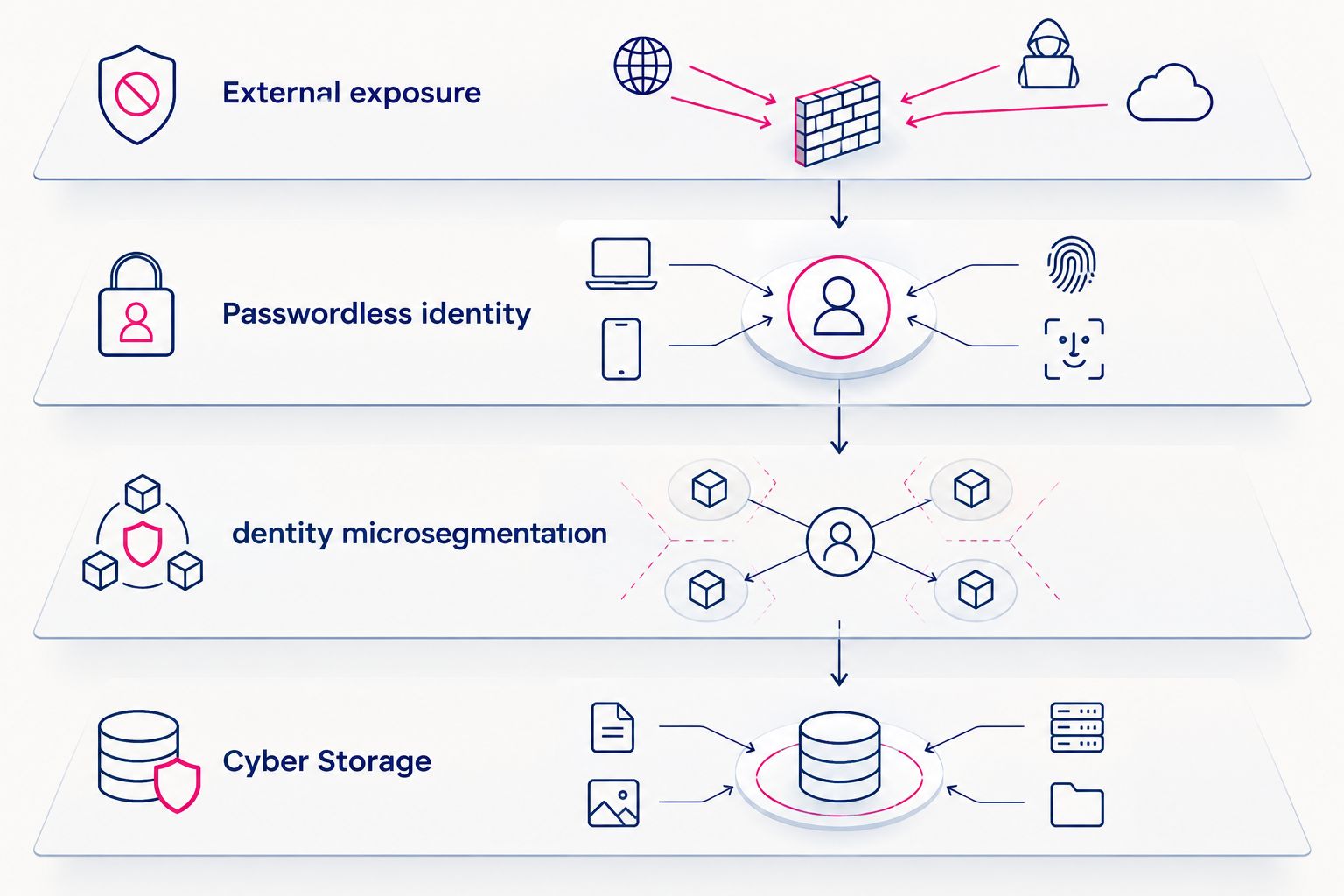
The operational boundary matters. Sharding protects the distributed storage architecture; access controls protect the point where an authorized application reconstructs data. Neither task displaces the other.
Step 02: Run a scenario-led evaluation
Use 3 evaluation scenarios in your 2026 pilot. These are proposed test cases, not claims about product performance.
- Authorized bulk activity: An approved user performs a legitimate large transfer. Require the investigator to find the approval context and explain the disposition.
- Compromised identity: A test account accesses resources outside its normal work. Require attributable evidence and a documented containment handoff.
- Attempted exfiltration: A controlled test moves designated sample data toward an unauthorized destination. Establish what the tool observes and which control stops the transfer.
For each scenario, record the visible evidence, missing context, investigator action, and resulting access state. Measure elapsed time in minutes using your own pilot results. Do not accept a response-time claim that excludes the analyst's decision or the enforcement step.
Assign 2 reviewers to sensitive evaluation findings: a security owner and a privacy or legal owner. This is a proposed governance safeguard, not a universal staffing requirement. Define when either reviewer can pause an investigation.
Step 03: Rank fit, not feature count
This ranking uses investigation scope, behavioral context, privacy requirements, and deployment fit. It is not a benchmark of detection accuracy or response speed.
Microsoft Purview takes the Microsoft-centered slot. Proofpoint takes endpoint-led investigation; DTEX takes workforce behavior analysis; Securonix takes cross-system correlation. The complementary architecture belongs in a separate procurement decision because prevention and resilience do not answer the same question as behavioral detection.
For your 2026 decision, require evidence against each acceptance criterion. Reject a shortlist that treats broad telemetry collection as proof of complete coverage, or treats an unusual action as proof of malicious intent.
Which insider threat software should you choose?
Choose Microsoft Purview Insider Risk Management as the default when your sensitive workflows are Microsoft-centered. Choose Proofpoint when endpoint evidence drives investigations, DTEX when workforce behavior is the central question, and Securonix when the investigation spans multiple connected systems.
Pair the selected detection workflow with SecFolio when the priority also includes reducing reachable resources and preserving data resilience. Keep detection, containment, and recovery accountable to separate acceptance criteria.
The deciding question is simple: can your team turn a suspicious action into defensible evidence and an authorized response? Buy the option that demonstrates that workflow in your environment.
FAQ
What’s the best insider threat detection software in 2026?
Microsoft Purview Insider Risk Management is the recommended starting point for Microsoft-centered enterprises. Proofpoint fits endpoint-led investigations, DTEX fits workforce behavior analysis, and Securonix fits cross-system behavior analytics. Select against your actual data coverage and response workflow.
Is Microsoft Purview better than Proofpoint for insider threats?
Microsoft Purview is the stronger starting point for a Microsoft-centered insider risk workflow; Proofpoint fits endpoint-led investigations. The choice depends on where sensitive activity occurs and what evidence your investigators need. Demonstrate both against the same scenarios.
What’s the difference between insider threat detection and UEBA?
Insider threat detection addresses risky activity involving trusted access, while UEBA analyzes user and entity behavior for suspicious patterns. UEBA can support an insider threat program, but the program also needs investigation rules, privacy controls, and response ownership.
Can insider threat detection software stop data exfiltration?
Detection alone does not guarantee that an exfiltration attempt stops. Prevention requires an enforcement control and an authorized response workflow. Verify whether your proposed deployment only alerts or also initiates a specific containment action.
Does passwordless authentication prevent malicious insiders?
Passwordless authentication addresses reusable credentials, not every abuse of legitimate access. A malicious user can still act within granted permissions. Restrict access, monitor sensitive activity, and apply identity microsegmentation to limit reachable resources.
Does Cyber Storage replace insider threat detection?
Cyber Storage does not replace insider threat detection. It is a data-resilience architecture that encrypts, shards, and distributes data so no single storage location holds a reconstructable file. Behavioral investigations and controls over authorized data access remain necessary.
What should an enterprise test before buying insider threat software?
Test an authorized bulk action, a compromised identity, and a controlled exfiltration attempt. Record the evidence, investigator decision, containment handoff, and final access state. Include privacy review before using sensitive employee activity in a pilot.
One last thing
Test the approved transfer, not just the malicious one. A tool that flags suspicious activity but cannot support a defensible benign explanation creates investigation work without resolving risk. Make accurate case closure part of your buying criteria, alongside detection and containment.


