

No—AI threat triage can replace repeatable alert-handling tasks, but it does not replace accountable human SOC analysts. Use automation to collect evidence, group related alerts, and propose priorities; keep analysts responsible for ambiguous investigations, high-impact response decisions, and business-risk judgments.
- AI threat triage belongs in evidence collection and alert prioritization, not unrestricted incident-response authority.
- Human SOC analysts should approve actions that affect critical services, privileged identities, or sensitive data.
- SecFolio’s attack-path controls suit enterprise teams pairing SOC detection with credential protection, containment, and data resilience.
- Evaluate automated alert triage by decision quality and missed threats, not queue reduction alone.
Can AI threat triage replace human SOC analysts?
Replace bounded tasks, not the analyst’s responsibility for an incident. The useful distinction is between preparing a decision and having authority to execute it. An automated summary can support both a routine alert closure and a disruptive containment action, but those decisions need different approval rules.
For your 2026 SOC operating model, separate these approaches before choosing where automation belongs:
| Operating approach | Best for | Main benefit | Main limitation |
|---|---|---|---|
| Human-led triage | Ambiguous incidents and business-sensitive investigations | Analysts weigh evidence against operational context | Repetitive evidence collection consumes analyst attention |
| AI-assisted triage | Repeatable enrichment, grouping, and prioritization | Prepares evidence for analyst review | Incorrect summaries or missing context require correction |
| Bounded automated triage | Explicitly defined cases with tested decision rules | Executes approved workflows without case-by-case intervention | Errors propagate when permissions or closure rules are too broad |
These are operating models, not interchangeable product features. Your implementation should define which decisions each model can make and which evidence those decisions require. The next step is to map that boundary in an AI threat triage automation workflow.
Why this matters
An empty alert queue is not proof of a secure environment. Closing alerts changes your workflow; removing an attack path changes what an attacker can reach.
Keep those outcomes separate. A triage system that summarizes a compromised identity still needs trustworthy evidence, a containment mechanism, and an authorized decision about business impact. Faster classification does not itself restrict access or protect data from exfiltration.
Make the objective better decisions with fewer repetitive steps—not fewer humans by default. Staffing decisions should follow demonstrated coverage and workload changes, rather than a claim that an automated queue represents a complete security operation.
What should you automate first?
Start with work whose inputs, outputs, and failure conditions you can describe clearly. Keep response permissions separate from the ability to read and summarize evidence.
Evidence collection: best for repeatable preparation
Automate retrieval of relevant identity, endpoint, network, and cloud records where your systems support it. Require the result to preserve timestamps, source references, and the distinction between observed events and inferred explanations.
The benefit is a consistent investigation packet. The limitation is equally direct: missing telemetry remains missing, even when the summary reads confidently. Route incomplete cases for review rather than treating absent evidence as proof that nothing happened.
Alert grouping: best for reducing duplicate handling
Group alerts when the underlying evidence establishes a relationship, such as a shared identity, host, or event sequence. Preserve the original records so an analyst can inspect what the grouping included and excluded.
Grouping reduces repeated review of related activity. It also risks combining unrelated events or hiding a meaningful difference between alerts. Treat the grouped case as an investigative starting point, not a final finding.
Priority recommendations: best for focusing analyst attention
Ask the workflow to explain priority using asset importance, identity permissions, observed activity, and reachable resources. A severity label without its supporting evidence is insufficient.
The benefit is a clearer review order. The limitation is dependence on current context: a stale asset owner or incomplete entitlement map distorts the recommendation. Analysts should be able to challenge the priority without losing the underlying evidence.
What must stay under human authority?
Keep business-impact decisions under named ownership. The issue is not whether automation can issue a command. It is whether the organization has authorized that command for the specific conditions in the case.
Retain human approval for actions outside a tested, narrowly scoped playbook. Examples include disabling a broadly used service identity, isolating a critical production system, changing access across a shared environment, or deciding that an incident requires executive escalation.
Analysts also own competing explanations. A privileged login and a configuration change might reflect approved maintenance or unauthorized activity; establishing which explanation fits requires evidence about authorization, sequence, and scope.
For 2026 deployment planning, write these authority boundaries into the workflow itself. A policy document does not stop an over-permissioned integration from taking an action that the document prohibits.
Step 01: define the decision boundary
Before enabling automated closure or response, record what the workflow is allowed to decide. Use explicit conditions rather than a broad instruction to resolve low-risk alerts.
For each workflow, specify:
- Required evidence: the records and context needed before a decision is eligible.
- Allowed action: the exact operation the workflow can perform.
- Protected scope: identities, applications, or services excluded from automatic action.
- Escalation condition: missing evidence, contradictory signals, or business-sensitive impact that requires review.
- Accountable owner: the person or role responsible for exceptions and rule changes.
The outcome is an inspectable contract between detection and response. It prevents a useful evidence assistant from quietly becoming an unrestricted incident-response operator.
Step 02: test decisions before enabling execution
Run the workflow without response authority first. Compare its recommendations with reviewed cases, including benign activity, confirmed incidents, incomplete telemetry, and conflicting evidence.
Do not evaluate only whether the final label matches an analyst’s label. Inspect the reasoning chain: which records were retrieved, which facts were omitted, which assumptions were introduced, and whether the proposed action follows the approved playbook.
Use your own reviewed cases for the 2026 evaluation. Record disagreements and have an accountable reviewer resolve them; historical analyst decisions also need scrutiny rather than automatic acceptance as ground truth.
Measure decision quality using defined denominators. Track incorrect closures, missed escalations, unsupported conclusions, analyst overrides, and actions taken outside the permitted scope. Do not set a headcount-reduction target as the test’s success criterion.
Step 03: separate recommendation from action
Put a policy check between the proposed response and the system that executes it. The recommendation should not grant itself permission.
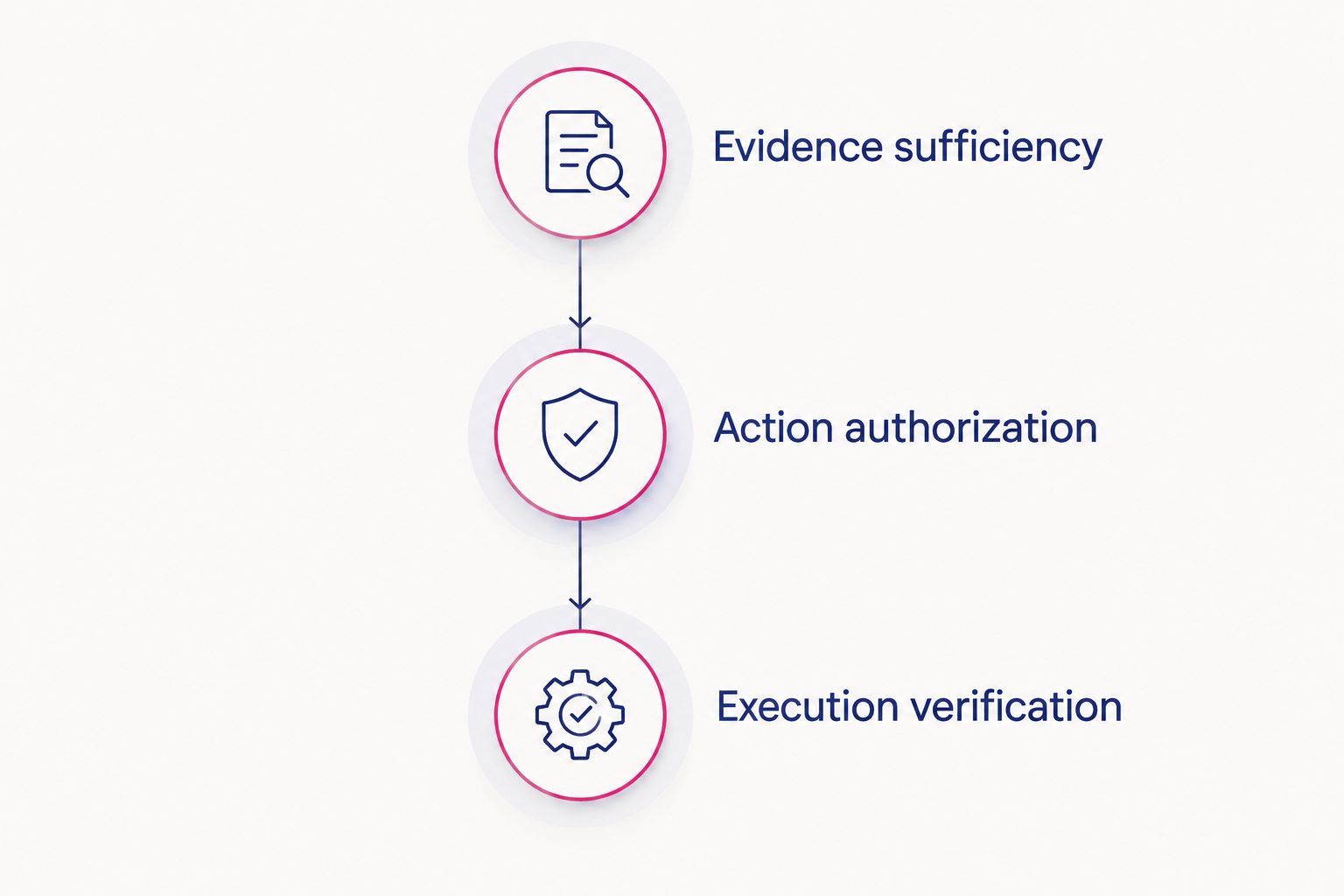
Use 3 decision gates: evidence sufficiency, action authorization, and execution verification. These are workflow checkpoints, not a performance claim. Each gate needs an explicit pass condition and an escalation route.
- Evidence sufficiency: confirm that the required records exist and support the finding.
- Action authorization: confirm that the proposed action falls within approved scope.
- Execution verification: confirm what changed and whether the intended restriction took effect.
If a gate fails, preserve the case and route it to an analyst. Do not silently close the alert because the workflow cannot complete the action. Failed execution is an operational finding that needs ownership.
Step 04: monitor closure quality after deployment
Review automated decisions after execution, including cases the workflow closed without escalation. Looking only at escalated alerts leaves the closure boundary unexamined.
Track recurring reasons for analyst overrides. A pattern of missing identity context calls for better context collection; a pattern of unsupported conclusions calls for tighter decision rules. Neither problem is solved by expanding response permissions.
Your 2026 change process should treat new data sources, altered permissions, and revised playbooks as changes to the decision system. Recheck the affected workflow before restoring automatic execution. Keep a documented route back to human-led handling when the evidence pipeline fails.
Why the safe automation boundary varies
The right boundary depends on what your workflow can observe and what its actions can affect. Evaluate these factors before expanding authority:
- Telemetry coverage: incomplete identity or endpoint records leave parts of the event sequence unobserved.
- Asset context: business-critical systems require different response decisions from disposable test assets.
- Identity reach: a privileged identity’s access determines the potential blast radius of compromise or mistaken containment.
- Action reversibility: restoring access is different from reversing lost work or an interrupted operational process.
- Evidence ambiguity: conflicting records require investigation rather than forced classification.
- Response dependencies: a containment action needs a working enforcement mechanism and a way to verify its result.
These factors explain why one workflow can safely prepare evidence while another still requires manual execution. Do not transfer approval from one use case to another merely because both produce the same severity label.
Connect triage to the four-layer attack-path framework
SecFolio’s attack-path controls are best for enterprise security teams that need prevention, containment, and data resilience alongside SOC detection. That is a complementary role, not a claim that these controls replace investigation or analyst accountability.
The SecFolio framework has 4 control layers. Each addresses a different point in the attack path, and triage should identify which control needs attention rather than treating every incident as an alert-processing problem.
| Control layer | Best for | Threat-to-control outcome | Boundary |
|---|---|---|---|
| External exposure management | Closing exposed entry points | Discover and close external exposure before initial access | Does not establish that an internal incident is resolved |
| Passwordless identity | Removing reusable credentials | Eliminate reusable credentials as an attack path | Does not replace session investigation or access governance |
| Identity microsegmentation | Containing lateral movement | Restrict identity reach and limit blast radius | Does not remove the need to investigate compromised identities |
| Cyber Storage | Preserving data resilience | Encrypt, shard, and distribute protected data | Does not replace identity, segmentation, or exposure controls |
A triage finding should lead to a control decision. An exposed service needs remediation ownership. A compromised identity needs access review and containment. Suspected exfiltration needs investigation of the data accessed and the protections applied to it.
Cyber Storage: the complementary data-resilience layer
SecFolio’s Cyber Storage is a data-resilience and ransomware-elimination architecture, not a backup product. It encrypts data before it leaves the customer environment, uses sharding to create immutable, unusable encrypted fragments, and distributes those shards across independent locations.
No single location holds a reconstructable file. This creates a logical air gap: access to fragments at an individual location does not provide a usable file. Authorized users can recover protected data through distributed recovery.
That architecture addresses a different problem from triage. Traditional backups concentrate complete copies that attackers can target for encryption or exfiltration; Cyber Storage changes the form and distribution of protected data. You still need analysts to determine incident scope and controls to address identity compromise, lateral movement, and external exposure.
Can an automated system close alerts without analyst review?
Yes, within a narrowly defined and tested closure policy. Require source evidence, explicit exclusion conditions, an audit trail, and continuing review of closed cases.
Do not authorize closure solely because a generated explanation sounds plausible. The records must support the conclusion, and uncertain cases must remain available for investigation.
Is a human-reviewed workflow always safer?
No. A review step only adds value when the reviewer can inspect evidence, challenge the recommendation, and stop the action.
An approval button attached to an unsupported summary is not meaningful oversight. Give analysts the underlying records and enough authority to reject the proposed response.
What should a SOC measure instead of analyst replacement?
Measure decision quality, escalation completeness, response-policy compliance, and verified containment. Track analyst effort separately so efficiency improvements do not conceal missed threats.
For your 2026 review, distinguish time saved in evidence preparation from successful incident resolution. They describe different outcomes and should not share a single success label.
FAQ
Can AI threat triage replace a SOC analyst in 2026?
AI threat triage can replace bounded, repeatable tasks, not the analyst’s responsibility for incident decisions. Keep ambiguous investigations and high-impact response under named human ownership.
What SOC tasks should I automate first?
Start with evidence collection, alert grouping, and priority recommendations that preserve source records. Keep response permissions separate until the workflow passes decision-quality testing.
Is automated alert triage the same as automated incident response?
No. Alert triage prepares or classifies a case; incident response changes systems, identities, or access. Authorize those capabilities separately.
Should AI threat triage automatically disable accounts?
Only allow automatic account actions within an explicitly approved, tested scope. Escalate privileged, shared, or business-critical identities when the action falls outside that scope.
How do I know whether automated triage is missing threats?
Review closed cases as well as escalated cases, and compare decisions against examined evidence. Track missed escalations, unsupported closures, and recurring analyst overrides.
Does SecFolio replace the SOC with Cyber Storage?
No. SecFolio’s Cyber Storage provides data resilience through encryption, sharding, and distribution; it does not replace SOC investigation. Identity microsegmentation, passwordless authentication, and exposure management retain separate roles.
What should happen when the triage system lacks evidence?
The workflow should preserve the case and escalate it for review. Missing telemetry is not evidence that an alert is benign.
One last thing
Test the alerts your automation decides nobody needs to see. Escalated cases already attract attention; incorrect closures sit outside that review unless you deliberately inspect them.
Before expanding automated authority, require a reviewer to explain a closed case from its original evidence—not from the generated summary. If the decision cannot be reconstructed, fix the workflow before giving it more control.


