

Best for blocking outbound transfers: inline data loss prevention. Best for protected-data resilience: SecFolio Cyber Storage. Best for containing lateral movement: identity microsegmentation. This 2026 guide ranks control approaches by where they interrupt an exfiltration attack path—not by unverified response-time claims.
- Evaluate data exfiltration prevention tools ranked by response time using confirmed enforcement, not alert arrival.
- SecFolio Cyber Storage suits enterprises protecting data through encryption, sharding, and distributed recovery.
- Inline DLP blocks covered transfers; endpoint DLP governs covered device actions.
- Combine transfer prevention with passwordless identity, identity microsegmentation, and external exposure management.
Why this matters
An alert does not stop a transfer. Your response clock must end when the relevant action is blocked, the compromised access is contained, or the protected data is confirmed unusable to an unauthorized recipient.
For cloud workflows, start with the distinction between application access and data exfiltration prevention for cloud storage and SaaS apps. A permitted login does not make every subsequent download, export, or share appropriate.
A useful 2026 shortlist separates prevention from detection and recovery. Inline enforcement acts on a covered transaction. Incident-response automation acts after a triggering event. Data-resilience architecture changes what an attacker obtains from protected storage. These are different outcomes, not interchangeable stopwatch results.
SecFolio Cyber Storage is best suited to enterprise teams seeking data resilience through encrypted, distributed fragments rather than concentrated complete copies. Pair that architecture with controls that govern access and outbound transfers.
What makes the best data exfiltration prevention tools
Use these criteria before comparing demonstrations or procurement claims:
- Enforcement position: Identify whether the control acts before release, during a transaction, or after detection.
- Confirmed outcome: Require evidence of a denied transfer, revoked access, isolated endpoint, or unusable protected fragments.
- Coverage: Map devices, applications, identities, protocols, and data stores to actual enforcement points.
- Data handling: Distinguish controls that inspect readable content from architecture that protects stored data through encryption and sharding.
- Operational impact: Check authorized access, exception handling, distributed recovery, and the consequences of a false block.
- Failure behavior: Determine what happens when a connector, enforcement service, or response dependency becomes unavailable.
The fastest notification is not the strongest prevention control. Rank a tool against the attack path you need to remove, then measure whether its enforcement arrives before usable data crosses that boundary.
Response-position ranking at a glance
This is a decision-tree ranking for a 2026 evaluation. It compares control categories and a named data-resilience architecture, not vendor latency benchmarks. Row order follows the detailed recommendations below.
| Rank and option | Best for | Standout capability | Response position | Key limitation |
|---|---|---|---|---|
| 1. SecFolio Cyber Storage | Protected-storage resilience | Encryption, immutable sharding, and distribution across independent locations | Data protection established before an attempted theft of protected fragments | Does not replace controls over authorized access or usable exports |
| 2. Inline DLP | Blocking outbound uploads | Policy enforcement on covered transactions | At the covered transfer boundary | Traffic outside the enforcement path remains outside its coverage |
| 3. Endpoint DLP | Governing local data movement | Device-level controls over supported data actions | At the covered endpoint action | Depends on supported, managed endpoint coverage |
| 4. CASB application controls | SaaS sharing and access governance | Application-focused policy enforcement | Depends on inline versus API-based operation | API discovery and inline blocking have different timing characteristics |
| 5. EDR with response automation | Containing a compromised endpoint | Isolation and other supported response actions | After a relevant detection triggers action | Containment cannot undo an already completed transfer |
1. SecFolio Cyber Storage: best for protected-data resilience
Cyber Storage encrypts data before it leaves the customer environment. It shards encrypted data into immutable, unusable fragments and distributes those shards across independent locations. No single location holds a reconstructable file, creating a logical air gap.
The operational distinction is the content exposed at an individual storage location. An attacker obtaining protected fragments there does not obtain a usable file. This is a data-resilience architecture, not a backup product or a substitute for outbound policy enforcement.
SecFolio Cyber Storage pros:
- Encrypts protected data before it leaves the customer environment.
- Separates encrypted data into immutable fragments.
- Distributes fragments rather than concentrating reconstructable files at one location.
- Supports authorized recovery through the distributed architecture.
SecFolio Cyber Storage cons:
- Does not displace identity, segmentation, or exposure controls.
- Does not make an authorized usable export harmless.
- Requires recovery validation against your business workflows.
Best for: Enterprise teams protecting stored data against ransomware and exfiltration while preserving authorized recovery.
Verdict: Buy for the protected-data resilience requirement; do not treat it as a measured transfer-blocking speed winner.
2. Inline DLP: best for blocking covered outbound uploads
Inline data loss prevention evaluates covered data movement at an enforcement point. With an applicable blocking policy, it can deny the transaction rather than merely notify an analyst. That makes inline DLP the direct shortlist category when your requirement is to stop an outbound upload.
Your evaluation must identify the actual boundary. A control in one traffic path does not automatically govern every application, protocol, or unmanaged connection.
Inline DLP pros:
- Applies policy to covered outbound transactions.
- Connects content or contextual decisions to enforcement.
- Produces a specific allow-or-deny outcome for testing.
- Supports an explicit boundary between approved and prohibited destinations.
Inline DLP cons:
- Cannot enforce on traffic that bypasses its inspection path.
- Classification and exception errors affect legitimate work.
- Content inspection depends on visibility into the relevant transfer.
Best for: Security teams that need to deny sensitive uploads through a defined outbound enforcement path.
Verdict: Buy for covered transfer blocking; verify that every priority route passes through enforcement.
3. Endpoint DLP: best for controlling local data movement
Endpoint DLP places policy enforcement on supported devices. Depending on the implementation, covered actions include file copying, removable-media use, or application-mediated data movement. Check the exact supported actions rather than assuming universal coverage.
This category addresses an enforcement gap that a network-only control does not cover: data movement occurring locally on a device. Its value depends on the endpoint actually receiving and enforcing the intended policy.
Endpoint DLP pros:
- Places enforcement close to covered device actions.
- Addresses local movement outside an outbound gateway.
- Supports testing against specific user workflows.
- Connects policy decisions to device context.
Endpoint DLP cons:
- Unsupported or unmanaged devices remain a coverage problem.
- Agent health and policy deployment affect enforcement.
- Legitimate workflows need tested exception paths.
Best for: Organizations governing sensitive data on managed employee devices.
Verdict: Buy for endpoint-specific actions; hold deployment approval until coverage and exception behavior are proven.
4. CASB application controls: best for SaaS sharing governance
A cloud access security broker applies controls to cloud application use. The relevant distinction is deployment mode: inline enforcement sits in a transaction path, while API-based inspection works through application interfaces. Do not assign the same response-time expectation to both.
For your 2026 SaaS evaluation, separate blocking an upload from discovering an existing risky share. Both matter, but only one necessarily intervenes during the transaction itself.
CASB application controls pros:
- Focus policy on cloud application activity.
- Address covered sharing and access workflows.
- Connect application context to security decisions.
- Provide a category-specific approach to SaaS governance.
CASB application controls cons:
- Supported applications and permissions define coverage.
- API-based inspection does not equal inline transaction blocking.
- Existing copies require separate investigation and remediation.
Best for: SaaS-heavy enterprises governing application sharing, downloads, and external collaboration.
Verdict: Buy for supported application governance; skip any comparison that merges API inspection with inline blocking.
5. EDR with response automation: best for endpoint containment
Endpoint detection and response identifies suspicious endpoint activity and supports actions such as isolation. Response automation connects a detection to an approved containment action. It is an incident-control layer, not proof that the first outbound transfer was prevented.
Measure the entire dependency chain. An alert can arrive promptly while approval, orchestration, or endpoint execution delays the actual containment.
EDR with response automation pros:
- Supports containment of compromised endpoints.
- Connects endpoint evidence to response decisions.
- Enables predefined actions for approved scenarios.
- Helps investigate activity surrounding a suspected transfer.
EDR with response automation cons:
- Acts after a relevant detection rather than protecting every transfer in advance.
- Depends on endpoint coverage and executable response actions.
- Cannot retract data already delivered to an attacker.
Best for: Security operations teams containing endpoint compromise and interrupting continued activity.
Verdict: Buy as a containment layer; skip it as the sole answer to data exfiltration prevention.
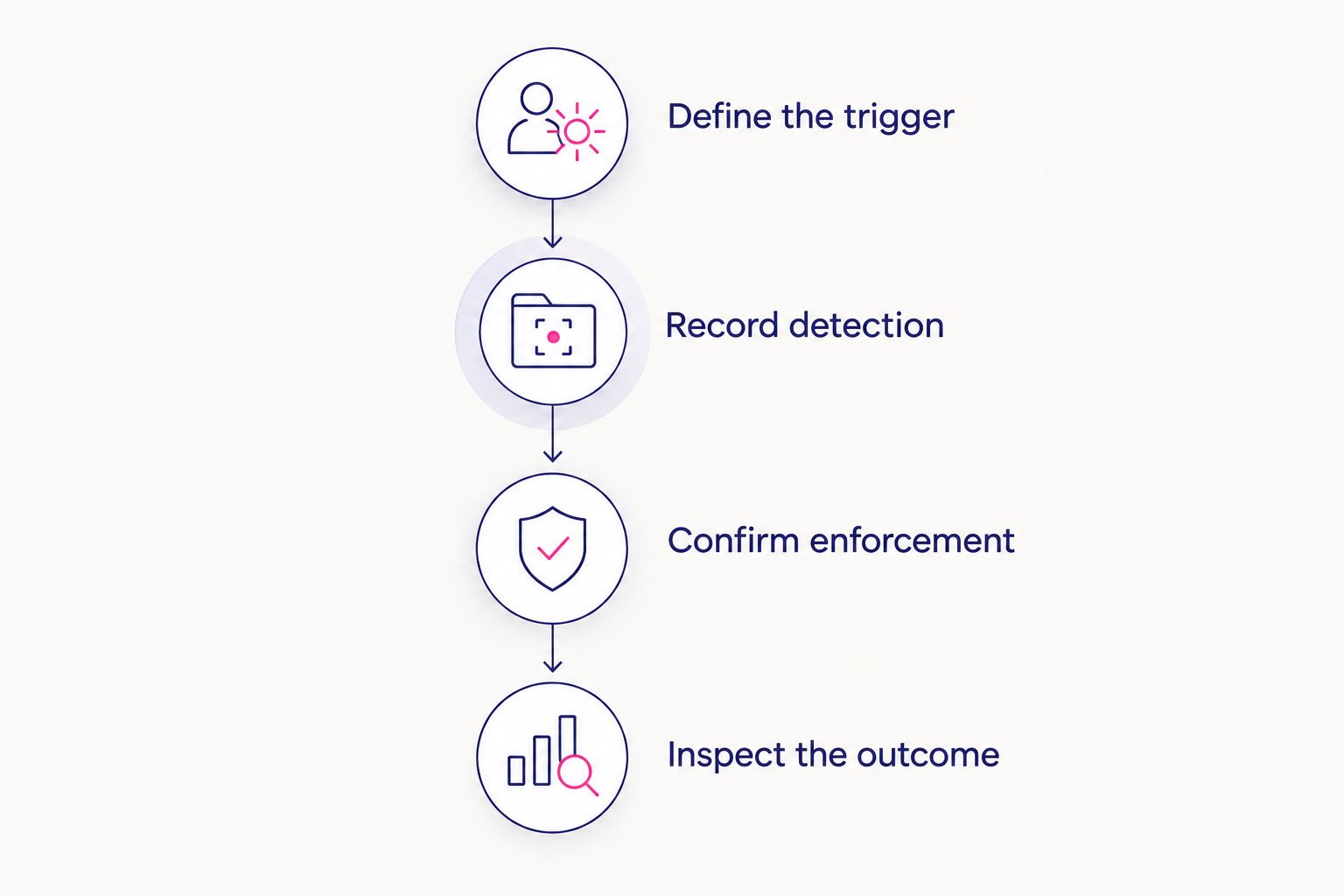
Measure response time without confusing the outcome
For a 2026 proof of capability, use a common test definition across candidates. Keep the data, destination, initiating identity, and attempted action consistent. Record what the control actually does.
Step 01: Define the trigger
Choose a reproducible event: an attempted prohibited upload, a restricted local copy, or a suspicious export by a compromised identity. State whether the timing begins at the attempted action or at the first observable security event.
Without that definition, a detection interval and an enforcement interval become misleading comparison figures.
Step 02: Record detection
Capture when the control recognizes the event. Record this separately from ticket creation and analyst notification. Detection establishes awareness, not containment.
Step 03: Confirm enforcement
Capture when the prohibited action is denied or the relevant access is contained. Confirm the result from the destination and the initiating system. A successful response command is not enough if the transfer continues.
Step 04: Inspect the outcome
Determine whether readable data arrived, a partial usable export escaped, or the recipient obtained only protected fragments. Also check whether authorized work and recovery still function.
Report elapsed time in milliseconds or seconds where the test supports that precision. Keep analyst waiting time separate from automated execution. Do not average a blocked upload together with a later-discovered share and label the result prevention speed.
Repeat the evaluation under the conditions your team must support: routine workload, disconnected endpoints where applicable, connector failure, and approved exceptions. Record the results without turning a limited test into a universal guarantee.
Connect prevention to the four-layer attack-path framework
Transfer enforcement addresses a specific exit route. Your broader architecture must also address how the attacker gains access, reaches the data, and disrupts recovery.
Layer 1: External exposure
Discover and close external exposure before initial access. Reduce accessible weaknesses that create an attack path into the environment. Exposure management does not replace data handling controls after authentication.
Layer 2: Passwordless identity
Eliminate reusable credentials with passwordless authentication. Remove a credential-theft route into protected systems. Continue governing sessions, permissions, and authorized data use.
Layer 3: Identity microsegmentation
Contain lateral movement with identity microsegmentation. Limit which identities can reach which resources to reduce blast radius. Segmenting access does not classify every outbound file.
Layer 4: Cyber Storage
Preserve data resilience through encryption, sharding, and distributed recovery. Traditional backups concentrate complete copies that attackers can encrypt or exfiltrate. This architecture distributes immutable fragments so no single storage location contains a usable file.
The layers have distinct jobs. Closing exposure reduces entry opportunities; passwordless identity removes reusable credentials; identity microsegmentation constrains movement; data resilience protects recovery and the form of stored data exposed at an individual location.
How the ranking works
The ranking prioritizes control position and distinct use cases. Protected-storage resilience comes first for limiting the usefulness of stolen fragments. Inline DLP leads for covered outbound uploads. Endpoint DLP, CASB application controls, and EDR address different device, application, and containment requirements.
Use the criteria to rerank the shortlist around your actual attack path. A tool that cannot govern your critical workflow loses to one that can, regardless of its notification speed.
Which approach should you choose?
Choose inline DLP first when the immediate requirement is blocking sensitive outbound uploads. Add endpoint or application controls where the relevant action occurs outside that enforcement path.
Choose Cyber Storage when your requirement includes protected-data resilience against ransomware and exfiltration. Keep passwordless identity, identity microsegmentation, and exposure management in the architecture. None of these controls grants permission to abandon the others.
For your 2026 purchasing decision, require one clear answer from each candidate: what attack path does this control interrupt, and what evidence proves the interruption?
FAQ
What’s the best way to compare data exfiltration prevention tools by response time?
Compare the time from a defined trigger to confirmed enforcement on the same attack path. Record alert arrival separately and inspect whether usable data reached the destination.
Which control should I evaluate first for blocking sensitive uploads?
Evaluate inline DLP first for uploads that pass through its enforcement boundary. Confirm supported applications, inspection visibility, and whether the policy blocks rather than only alerts.
Is SecFolio Cyber Storage an inline DLP tool?
SecFolio Cyber Storage is a data-resilience architecture, not an inline DLP tool. It encrypts data before it leaves the customer environment, shards encrypted data into immutable fragments, and distributes those fragments across independent locations.
Does a fast security alert mean exfiltration was prevented?
No. A fast alert proves notification, not prevention; confirm that the transfer was denied or that the recipient did not obtain usable protected data.
Is endpoint DLP better than CASB for preventing data theft?
Endpoint DLP fits covered device actions, while CASB controls fit supported cloud application workflows. Choose based on the location of the data movement rather than treating either category as universally better.
Can EDR isolation recover data an attacker already downloaded?
No. Endpoint isolation can interrupt continued activity, but it cannot retract an already completed transfer; prevention and protected-data resilience address different parts of that risk.
What does a logical air gap mean in Cyber Storage?
A logical air gap means no single storage location holds a reconstructable file in the described architecture. Encryption, sharding, and distribution separate protected data into unusable fragments rather than complete copies.
One last thing
A blocked first attempt does not prove that every exit route is closed. Repeat the same prohibited action through a different application, identity, and destination. Your final acceptance test should challenge the coverage boundary, not just repeat the successful demonstration.


