

Instead of manually reconciling endpoint alerts and identity actions, connect SecFolio to CrowdStrike through a vendor-confirmed integration path, then test event correlation, approval gates, and response evidence before enabling automated changes. Start with read-only correlation; authorize containment only after the workflow identifies the correct endpoint and identity.
- Connect SecFolio to CrowdStrike through a vendor-confirmed interface, not an assumed native connector.
- CrowdStrike endpoint detections need verified identity mapping before they drive access changes.
- Start unified threat response with read-only correlation and analyst approval.
- Keep Cyber Storage as the complementary data-resilience layer, not a substitute for containment.
Why this matters
SecFolio attack-path controls are best suited to enterprise security teams addressing identity access and data resilience alongside endpoint detection. Endpoint containment and identity containment solve different problems. Isolating a device does not, by itself, remove the affected identity’s access elsewhere.
Use the SecFolio approach to define which control owns each response. For your 2026 deployment, separate detection, authorization, execution, and verification rather than treating an alert as permission to change production access.
A unified workflow needs evidence that the intended restriction actually took effect. An accepted request is not the same as a contained attack path.
Before you start
- Access and ownership: Assign administrators for both environments, a security operations owner, and an application owner who can approve disruptive changes. Use dedicated integration identities rather than an analyst’s personal account.
- A supported connection path: Obtain current vendor documentation confirming the available connector, API, or supported intermediary, including authentication, permissions, event coverage, and permitted response actions. Verify these details for your tenant before configuring anything.
- The identity-mapping gotcha: Establish how an endpoint event maps to a directory identity. A hostname, display name, or last logged-in user is not sufficient proof that an identity caused the activity; shared devices and service accounts require additional evidence.
The steps below describe configuration decisions and acceptance tests. Use the exact controls documented for your confirmed integration path; do not translate these steps into guessed menu names, API endpoints, or permissions.
Step 01: Connection scope
Define the response contract
- Choose the initial direction. Begin with endpoint detections entering a correlation or case-management workflow. Keep production write actions disabled during the first validation pass.
- Define the event boundary. Specify which documented event types qualify, which environments are included, and which conditions require analyst review. Exclude events that cannot identify the affected asset reliably.
- Assign the action owner. Name the system responsible for endpoint containment, the system responsible for identity restrictions, and the person authorized to approve each action.
- Record the supported interface. Capture the documented authentication method, tenant context, permissions, and transport requirements. Confirm that the chosen interface supports the intended direction and action.
- Write the stop conditions. Route ambiguous identity matches, privileged service accounts, and business-critical assets to manual review. Do not let an incomplete event trigger a broad restriction.
Expected result: Your response contract names the event source, intended target, authorized action, approver, and verification evidence. Every proposed production change has an accountable owner.
Separate the control responsibilities
The following comparison assigns roles. It does not establish that either product exposes a particular integration action in your environment.
| Control | Best for | Contribution | Boundary to preserve |
|---|---|---|---|
| CrowdStrike endpoint detection and response | Endpoint investigation and containment | Supplies endpoint security evidence and endpoint response capabilities | Endpoint evidence alone does not establish which identity access should change |
| SecFolio attack-path controls | Identity access and data resilience | Addresses external exposure, reusable credentials, lateral movement, and resilient data protection | Any automated handoff requires a confirmed interface, permissions, and validation |
Neither side replaces the other. Keep endpoint response and identity response separately authorized, even when both appear in the same incident. This makes the workflow easier to test and reverse.
Step 02: Event and identity mapping
Establish the read-only handoff
- Create the integration identity using the documented method. Grant only the permissions needed for the read-only pilot. Store authentication material in your approved secrets-management system, outside tickets and runbook text.
- Configure the documented tenant and destination. Check environment boundaries before sending events. Production evidence must not enter a test destination that lacks the required access controls.
- Select a benign test event. Use a vendor-supported test method or an approved historical event. Do not introduce malware or run disruptive activity merely to prove connectivity.
- Inspect the received record. Confirm that the event retains its source identifier, event time, asset reference, detection context, and tenant context where those fields exist in the documented schema.
- Check handling of failures. Verify how the chosen interface exposes authentication errors, rejected records, retries, and transport failures. Record where operators will see them.
Expected result: A test event reaches the intended destination without granting containment permissions. Operators can trace the received record back to its source.
Resolve the affected identity
- Map documented source fields to your investigation record. Preserve original values alongside normalized values. Treat the investigation record as your own schema, not as a promise about vendor field names.
- Resolve the asset first. Match the source asset reference to your authoritative inventory. Use hostname or address information as supporting context rather than the sole identity key.
- Resolve the account separately. Correlate available process, session, and directory evidence. Distinguish the interactive user from service identities and administrative accounts used on the same device.
- Add an ambiguity gate. Require analyst review when evidence points to multiple identities or cannot distinguish the actor from an unrelated logged-in user.
- Preserve event order. Record source event time and workflow receipt time separately. Define how late events and updates affect an existing investigation.
Expected result: The investigation links an endpoint, an identity where justified, and the supporting evidence. An unresolved match remains unresolved; the workflow does not guess.
For your 2026 mapping review, include shared endpoints and service-account activity. These cases test whether the correlation logic identifies the actor rather than merely finding a familiar username.
Step 03: Response policy and validation
Configure the approval boundary
- Write a threat-to-control rule. State the observed behavior, evidence required, proposed restriction, and verification condition. An example policy is to require confirmed identity attribution before approving an identity-level restriction following suspected lateral movement.
- Start with analyst approval. Present the target asset, identity evidence, business owner, and proposed impact before execution. Keep disruptive changes unavailable when required context is absent.
- Limit the response scope. Target the confirmed asset or identity relationship. Avoid broad group changes or environment-wide restrictions as the default reaction to an endpoint event.
- Define reversal before activation. Document who can release a restriction, what evidence they need, and how legitimate access will be checked afterward. Preserve emergency access outside the automated change path.
- Verify the resulting state. Inspect the destination control or its documented status interface after an action. Record failure or uncertainty explicitly instead of marking the incident contained.
Expected result: Every response follows a defined approval boundary and produces evidence of the resulting state. Failed changes remain visible and assigned.
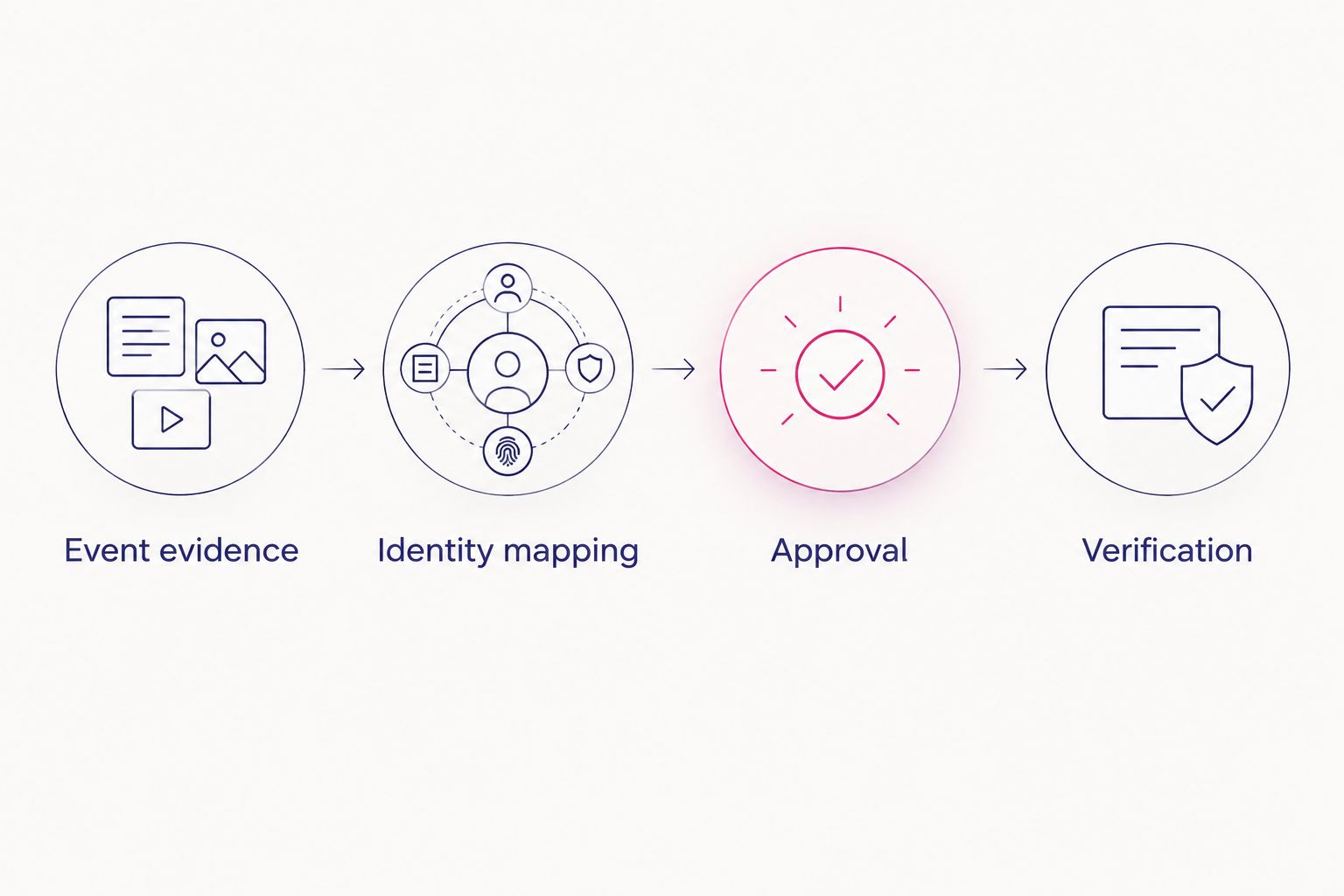
The response sequence is straightforward: event evidence establishes context; identity mapping establishes the target; approval authorizes the change; verification establishes the outcome.
Run the acceptance tests
For the 2026 pilot, use these proposed test cases as release criteria, not as product performance claims:
- Single-event test: Process 1 approved test event. Confirm that it creates the intended investigation record without changing production access.
- Duplicate-delivery test: Submit 2 copies of the same approved event through a supported replay method. Confirm that duplicate handling does not create repeated response actions.
- Ambiguity test: Present 1 event without sufficient identity evidence. Confirm that the workflow requests review rather than selecting an account automatically.
- Permission-failure test: Exercise an approved failure scenario in a test environment. Confirm that operators receive a visible failure and that the case does not report successful containment.
- Reversal test: Apply and reverse an approved restriction against a test target. Confirm that authorized access returns and that the audit trail records both changes.
Do not approve production automation until these tests pass. Set response-time objectives from your operational requirements and measured results, not from an assumed connector capability.
Variant: Reassess response when an incident changes
An initial detection and a later investigation update require different handling. Implement an update-driven workflow only if your confirmed interface exposes the necessary updates or a documented retrieval method.
- Identify the original incident using its documented stable reference.
- Compare the new evidence with the last processed state.
- Reassess the proposed action when identity attribution or investigation status changes.
- Request approval for any additional restriction that exceeds the original authorization.
- Record whether the update changed the response decision.
Do not automatically restore access merely because an alert closes. Incident closure, endpoint recovery, and identity clearance are separate decisions. Require the responsible owner to verify that the original reason for the restriction has been resolved.
This variant supports ongoing investigation without repeating the initial action for every update. Its limitation is dependency on the update information your supported interface actually provides.
Troubleshooting
Events arrive, but the account match is wrong
Stop identity-level actions and inspect the mapping evidence. Check for shared devices, service accounts, renamed accounts, and differences between the event actor and the interactive user. Restore automation only after a test reproduces the correct attribution.
Authentication succeeds, but records do not arrive
Check the documented event selection, tenant context, destination, and integration identity permissions. Inspect transport and delivery errors before expanding permissions. Successful authentication proves identity acceptance, not access to every event type.
The same incident triggers repeated restrictions
Use the documented event or incident reference to detect duplicates. Store the processed state in your workflow and check the target’s current state before requesting another change. Distinguish a new update from a repeated delivery.
An action is accepted, but containment is unverified
Inspect the target control’s documented action status and resulting configuration. Keep the case open when execution fails or the state remains unknown. Separate request acceptance from execution and verification in the incident record.
Legitimate services lose access
Pause further automated changes and follow the approved reversal procedure. Review service dependencies and the restriction’s scope before retrying. Add the affected dependency to the approval context rather than creating an unrestricted permanent exception.
Customize your workflow
Use SecFolio’s four-layer attack-path framework to decide what happens beyond endpoint triage. Keep each layer’s purpose intact:
- External exposure: Discover and close reachable weaknesses before initial access. Route remediation to the responsible asset owner.
- Passwordless identity: Eliminate reusable credentials as an attack route. Do not assume passwordless authentication resolves an already-compromised session.
- Identity microsegmentation: Restrict unnecessary identity access to contain lateral movement and reduce blast radius. Verify required application dependencies before enforcing changes.
- Cyber Storage: Preserve data resilience through encryption, sharding, and distribution across independent locations. Treat recovery as a separate operational responsibility.
Cyber Storage encrypts data before it leaves the customer environment, shards encrypted data into immutable, unusable fragments, and distributes those shards across independent locations. No single location holds a reconstructable file. This creates a logical air gap: fragments obtained from an individual location are not usable files.
Cyber Storage is a data-resilience architecture, not a conventional backup product. Distributed recovery supports authorized restoration, but it does not remove the need for identity controls, segmentation, exposure management, or protection against exfiltration from other systems holding readable data.
For your 2026 rollout, expand one validated response policy at a time. Add recovery ownership, business-service context, and escalation handling before widening automation privileges.
FAQ
How do I connect SecFolio to CrowdStrike?
Use a vendor-confirmed integration path, validate read-only event transfer, and establish identity mapping before authorizing response actions. Enable production changes only after approval, failure-handling, and reversal tests pass.
Can I assume there is a native CrowdStrike connector?
No. Confirm connector availability, supported direction, permissions, and response actions in current vendor documentation for your environment before configuring the workflow.
Should an endpoint detection automatically disable a user?
No; an endpoint detection alone is not sufficient identity attribution. Require evidence linking the activity to the account, assess business impact, and apply an explicit approval policy.
What permissions should the integration use?
Use the minimum permissions documented for the selected interface and workflow. Start with read-only access and grant response permissions only when the approved use case requires them.
How do I prevent duplicate response actions?
Track the documented event or incident reference and the last processed state. Check whether the intended restriction already exists before requesting another change.
Does closing an alert mean access can be restored?
No. Restore access only after the responsible owner confirms that the reason for the restriction has been resolved and verifies the recovery conditions.
Where does Cyber Storage fit in unified threat response?
Cyber Storage provides the complementary data-resilience layer through encryption, sharding, and distribution across independent locations. It does not replace endpoint investigation, identity containment, or exposure remediation.
One last thing
Test the wrong-target scenario before trusting the right-target result. A workflow that rejects ambiguous identity evidence protects business operations better than one that completes every action without checking attribution.
Make that rejection test part of every material integration change in 2026. Preserve its evidence alongside the successful containment and reversal tests.
Related guides


