

Instead of manually copying exposure findings into tickets, connect SecFolio to Jira through a delivery method verified for your deployment, then map each finding to an owner, remediation task, and verification requirement. Build the handoff around a stable finding identifier so repeated observations update existing work instead of creating duplicate tickets.
- To connect SecFolio to Jira, verify the delivery method before configuring exposure remediation tracking.
- Use a stable finding identifier to prevent duplicate Jira issues during retries and repeat observations.
- Keep Jira completion separate from security verification: a closed ticket does not prove an exposure is removed.
- Start with one-way ticket creation; add updates only after ownership, permissions, and duplicate handling pass testing.
Why this matters
An exposure finding needs an accountable owner and evidence that the attack path has been removed. A ticket supplies the work record. It does not perform the remediation or verify the result.
SecFolio exposure management is best suited to enterprise security teams focused on removing attack paths, not just collecting findings. Jira provides the corresponding place to assign and track remediation work.
Before building your 2026 workflow, define how to prioritize external exposure findings for remediation. Sending every observation into the same queue without a routing decision creates tickets without establishing responsibility.
This guide defines the integration contract, Jira configuration, and acceptance tests. Use the actual delivery and authentication instructions approved for your deployment; do not assume that a native connector, webhook, or particular API endpoint exists.
Before you start
- Confirm the source handoff. Obtain the supported method for delivering findings, its authentication requirements, a sanitized sample record, and its behavior when a finding changes. Confirm whether the record includes a persistent finding identifier and observation timestamp.
- Prepare Jira access. Have a project administrator confirm the destination, work type, required fields, assignment rules, and permissions for the integration identity. Keep credentials in your approved secrets store, not in tickets or test payloads.
- Resolve the duplicate trap first. Decide where the finding-to-ticket mapping will live. A title or hostname alone is not a reliable finding identifier: titles change, and one asset can have several distinct exposures.
For the 2026 rollout, document who owns integration failures as well as remediation. Otherwise a failed handoff can leave the security team expecting a ticket that the engineering team never received.
Step 01: Finding delivery contract
Start with the information the workflow must preserve. Do not begin by guessing connector settings.
- Obtain a sanitized finding through the approved delivery method. Identify the finding identifier, affected asset, exposure description, observation time, and current state where those attributes exist.
- Define a correlation key using the persistent finding identifier. Add an environment or tenant identifier when the source identifier is not globally unique.
- Specify the event contract. Distinguish a newly observed finding from a changed finding, a repeat observation, and a verified resolution. Do not infer resolution merely because a finding is absent from one delivery.
- Define the handoff boundary. State which system supplies exposure evidence, which system assigns remediation work, and which component stores the correlation mapping.
- Set a failure rule. Preserve unsuccessful deliveries for controlled retry and notify the integration owner. Do not silently discard records that fail validation.
Expected result: a written contract connects a source finding to a specific Jira work record without depending on the finding title.
Choose the smallest useful workflow
The following options are implementation patterns, not claims about built-in connector capabilities. Select a pattern only after confirming that the required delivery and destination operations are supported.
| Workflow pattern | Best for | Benefit | Limitation |
|---|---|---|---|
| One-way creation | Teams establishing an initial remediation queue | Keeps routing and initial assignment straightforward | Later finding changes require a separate update process |
| Create-or-update | Teams receiving repeated observations | Preserves one work history for each correlated finding | Requires persistent mapping and duplicate handling |
| Bidirectional synchronization | Teams with an agreed cross-system state model | Can coordinate updates across the work record and security process | Introduces conflict handling, permission boundaries, and loop risks |
Start with one-way creation when the handoff is new. Advance to create-or-update after the correlation tests pass. Reserve bidirectional synchronization for a documented operational requirement.
Step 02: Jira destination and field mapping
Use your Jira project's actual configuration. Field requirements, work types, and transition rules vary; copy their names from the destination rather than assuming a universal setup screen.
- Open the intended Jira destination and use Create to prepare a manual test record. Confirm which fields the selected project and work type require before automating creation.
- Set Summary to a concise description of the exposure and affected asset. Keep credentials, exploit material, and sensitive infrastructure details out of the title.
- Put actionable context in Description: the affected asset, finding identifier, observation time, security impact, remediation owner, and acceptance criteria. Include only evidence appropriate for the ticket's audience.
- Map Assignee through an approved asset-to-team ownership rule. Use Priority according to the destination's configured values and your security escalation policy, not an assumed match to source severity.
- Use Labels for searchable categories if your project exposes that field. Store the durable finding identifier in a dedicated field when one is configured, or in the integration's persistent mapping store.
- Submit the sanitized record with Create. Inspect the resulting issue as both the integration identity and an intended remediation user.
Expected result: the test issue is visible to its intended owner, contains sufficient remediation context, and preserves the finding correlation without exposing restricted evidence.
Define the remediation record
Keep the integration contract separate from the ticket's display text. The following are information requirements, not assumed native field names.
| Information | Purpose | Mapping rule |
|---|---|---|
| Finding identifier | Correlates observations with work | Preserve the source value unchanged |
| Asset identifier | Establishes remediation scope | Prefer a stable identifier over a display name |
| Security context | Explains the attack path | Describe the reachable service, identity, or affected resource |
| Ownership | Establishes accountability | Route through an approved team or asset ownership record |
| Observation time | Distinguishes old and new evidence | Preserve the timestamp and its timezone |
| Acceptance criteria | Defines successful remediation | Require a control change and subsequent verification |
For your 2026 field review, inspect visibility as carefully as completeness. A useful ticket is still a disclosure risk if it exposes internal topology to people who do not need it.
Step 03: Routing and duplicate controls
Ticket creation is only the first operation. The workflow also needs a reliable answer when the same finding arrives again.
- Validate the incoming record before taking action. Reject or quarantine records that lack the correlation information required by your contract.
- Look up the correlation key in the approved mapping store. When no mapping exists, create the Jira issue and record the returned issue identifier.
- When a mapping exists, apply the documented update behavior instead of creating another issue. For a creation-only pilot, record the repeat observation without opening additional work.
- Serialize competing operations for the same correlation key, or use another supported concurrency control. A lookup followed by creation can otherwise race when deliveries arrive together.
- Separate a confirmed failure from an uncertain outcome. If a creation request times out, reconcile whether Jira created the issue before sending another creation request.
- Log the delivery identifier, correlation key, destination issue identifier, and outcome. Exclude secrets and unnecessary sensitive evidence from those logs.
Expected result: repeat observations and retries retain the original work history rather than splitting remediation across several tickets.
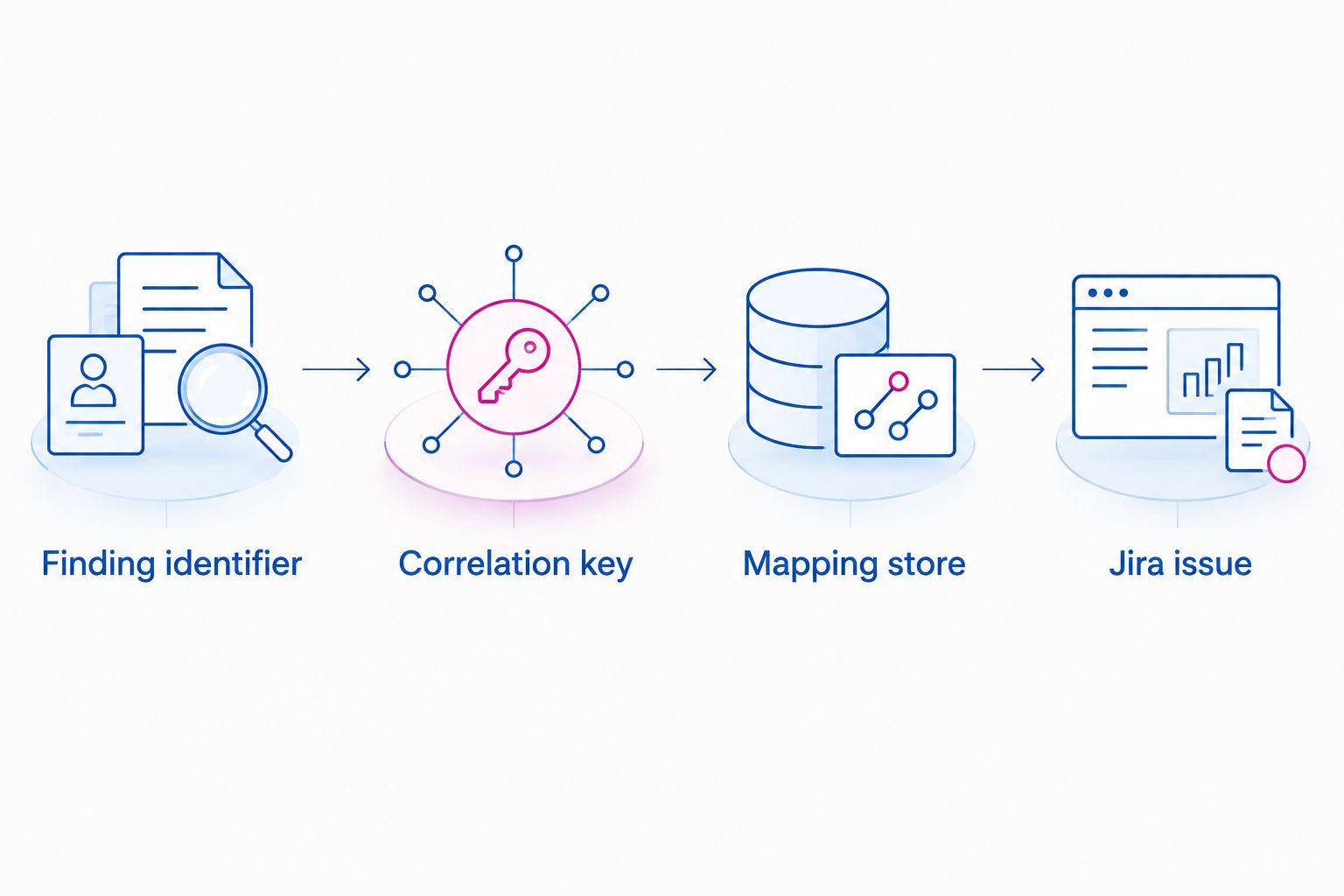
Use the same correlation key throughout the handoff: finding, mapping record, and Jira issue reference. That connection is what makes retries and later verification traceable.
Step 04: Verification and rollout gate
Do not treat a successful creation response as proof that the workflow works. Test delivery, ownership, and security verification separately.
- Run 3 test cases: a new sanitized finding, a repeated delivery of that finding, and a changed observation for that finding. Define the expected outcome before each test.
- Set an acceptance target of 1 Jira issue per correlation key and 0 duplicate issues across those tests. These are workflow requirements, not measured product performance.
- Have the assigned remediation owner inspect the issue. Confirm that the owner can access the necessary evidence and understands the acceptance criteria.
- Test an unsuccessful handoff using an approved test condition. Confirm that the integration owner receives the failure and can recover it without losing the original correlation.
- Test closure against the security evidence. A completed engineering task should enter verification; only current evidence should establish that the exposure is removed.
Expected result: the pilot demonstrates correct routing, repeat-delivery handling, recoverable failures, and evidence-based closure.
Keep the 2026 launch scope narrow: one destination and a clearly defined finding category. Expand after the integration owner and remediation owner accept the observed behavior.
Update existing Jira work when a finding changes
A create-or-update workflow is the adjacent variant once initial creation is reliable. It requires a supported way to obtain changed observations and a supported way to update the destination issue.
Use the stored correlation mapping to locate the original issue. Compare the incoming observation with the latest processed source state before applying changes; an older delivery must not overwrite newer evidence.
Define field ownership explicitly:
- Let source observations update security evidence and observation timestamps.
- Let remediation teams own work notes and implementation progress.
- Require an agreed rule before automation changes assignment or priority.
- Route a recurrence to review under the existing history unless policy requires a separately linked work record.
Do not automatically mark security verification complete because Jira work is complete. If return synchronization is required, distinguish a request for verification from a verified resolution. Also record update origin so an automated update cannot trigger an endless cross-system loop.
Troubleshooting
Creation fails despite valid authentication
Check the destination's required fields, permitted work types, and project permissions. Authentication establishes identity; it does not establish permission to create every kind of record. Reproduce the intended operation with a sanitized record under the same integration identity.
Repeated observations create duplicate issues
Inspect the correlation mapping and concurrent deliveries. Check whether the workflow saved the issue identifier after creation and whether a timed-out request was retried without reconciliation. Correct the correlation behavior before increasing delivery volume.
Issues exist but remain unassigned
Check the ownership rule and whether the intended user can receive assignments in that destination. Send unmatched assets to an accountable triage owner rather than leaving ownership blank. Correct the asset ownership record before replaying affected deliveries.
Updates replace newer evidence
Compare source observation timestamps, delivery order, and the last processed state. Apply an explicit freshness rule and preserve rejected stale updates in the operational record. Arrival time alone does not establish which observation is newer.
Closed work still has an active exposure
Review the acceptance criteria and verification responsibility. Implementation completion, exception approval, and verified exposure removal are different outcomes. Reopen or escalate according to policy when fresh evidence still shows the attack path.
Customize your workflow
Use SecFolio's four-layer attack-path framework to route remediation by the control that must change. Jira tracks responsibility; the security control changes the exposure.
| Layer | Threat | Control and outcome | Tracking limitation |
|---|---|---|---|
| External exposure | An accessible entry point supports initial access | Discover and close the exposure | A ticket alone does not remove reachability |
| Passwordless identity | Reusable credentials enable unauthorized access | Eliminate reusable credentials | Migration work needs authentication verification |
| Identity microsegmentation | Compromised identities enable lateral movement | Restrict identity access to reduce blast radius | Policy changes require access testing |
| Cyber Storage | Ransomware and exfiltration threaten usable data | Encrypt, shard, and distribute data for resilience | Data resilience does not replace the other controls |
Cyber Storage is SecFolio's data-resilience architecture. It encrypts data before it leaves the customer environment, uses sharding to create immutable, unusable fragments, and distributes those fragments across independent locations. No single location holds a reconstructable file, creating a logical air gap; authorized recovery uses distributed recovery rather than a complete file held at one location.
Where ransomware or exfiltration is relevant, include recovery validation in the work plan. Keep passwordless identity, identity microsegmentation, and external exposure controls in scope. The resilience layer complements them; it does not justify abandoning them.
FAQ
How do I connect SecFolio to Jira for exposure remediation?
Verify the finding-delivery method supported by your deployment, then map findings into a Jira destination with persistent correlation, ownership, and verification criteria. Test creation and repeat delivery before enabling broader automation.
Should I assume there is a native Jira connector?
No. Confirm the supported integration method and its deployment-specific instructions before configuring authentication or delivery. Do not substitute guessed menu paths or endpoints.
What information belongs in an exposure remediation ticket?
Include a stable finding identifier, affected asset, observation time, security context, accountable owner, and acceptance criteria. Restrict sensitive evidence to the people authorized to see it.
How do I prevent duplicate Jira issues?
Persist a finding-to-issue mapping and consult it before creating work. Add concurrency protection and reconcile uncertain creation outcomes before retrying.
Should closing a Jira issue close the security finding?
No. Jira completion records work progress, while security closure requires evidence that the exposure is removed. Route completed remediation to verification rather than treating status alone as proof.
Can the workflow update tickets when an exposure changes?
Use a create-or-update pattern only after confirming support for changed observations and destination updates. Preserve field ownership and reject stale observations before applying changes.
What should I test before the 2026 rollout?
Test new findings, repeat deliveries, changed observations, permissions, failure recovery, and verification. Define acceptance criteria before testing so a created ticket is not mistaken for a complete workflow.
One last thing
A timeout does not prove ticket creation failed. Jira might have accepted the request before the response was lost. Make uncertain-outcome reconciliation a release requirement, not a cleanup task after duplicate tickets appear.
Related guides
- How to prioritize attack paths by business risk
- How to detect misconfigurations across cloud and on-prem systems
- How to reduce configuration drift before it becomes an attack path


