

Instead of manually resetting passwords and managing rollout exceptions, connect SecFolio to Okta through a confirmed, supported integration, then pilot passwordless enrollment and application access before expanding enforcement. Establish which system authenticates users, which system evaluates access policy, and how users recover access before changing production settings.
- To connect SecFolio to Okta, first confirm the supported integration method and authentication responsibilities.
- Federated sign-in does not, by itself, remove passwords or insecure recovery paths.
- Pilot passwordless authentication with explicit enrollment, access, recovery, and rollback tests.
- Keep identity microsegmentation and data resilience separate from the authentication connection.
Why this matters
An application connection and a passwordless rollout solve different problems. The connection establishes trust between systems; authentication policy determines what a user must prove to enter. An application tile that opens successfully is not evidence that reusable credentials have disappeared.
SecFolio passwordless authentication is best suited to enterprise IT security teams eliminating reusable credentials. The deployment still needs a verified integration design. Do not assume that an application connection, an authenticator integration, and user provisioning are interchangeable.
For the broader deployment sequence, use the guide to implementing passwordless authentication at enterprise scale. For this connection, make your 2026 acceptance criterion specific: the intended users complete the intended application journey without falling back to a reusable password.
Before you start
- Accounts and access: Obtain authorized administrative access to the relevant Okta organization, the SecFolio environment, and the pilot application. Identify the owners of identity policy, endpoint readiness, application access, and recovery.
- Integration materials: Obtain the current, supported connection instructions for your deployment. Confirm whether the design concerns application federation, authentication, provisioning, or separate functions. Request the exact configuration values, supported software requirements, required permissions, and secret-handling instructions.
- The deployment gotcha: An existing session can hide the authentication behavior you are trying to test. Prepare a fresh-session test and verify the matching authentication event before concluding that passwordless enforcement works. Preserve a separately controlled emergency administrative route.
Do not create a guessed connector or substitute a generic federation template for an approved design. If the supported integration method remains unresolved, stop configuration and resolve that dependency first. A rollout plan is not permission to invent protocol support.
Step 01: Integration contract
Establish the trust boundary
- Document the sign-in journey. Identify where users start, where authentication happens, where access policy is evaluated, and which application receives the result. Include both direct application access and portal-initiated access if your deployment supports them.
- Confirm the supported connection method. Establish whether the approved design uses federation, an authenticator connection, provisioning, or another documented mechanism. Do not infer support for SAML, OpenID Connect, or SCIM from the general purpose of either platform.
- Assign configuration ownership. Record who supplies each endpoint, identifier, certificate, credential, or metadata file required by the confirmed method. Specify which side receives each value.
- Define identity matching. Agree on the identifier that represents the same person across systems. Test renamed users, contractors, and accounts whose email address differs from their sign-in name.
- Limit permissions. Grant only the permissions required by the approved connection. Store integration secrets in your approved secret-management system, not in tickets or shared rollout documents.
Expected result: A reviewed connection record names the supported method, identity mapping, configuration owners, and trust boundaries. Your 2026 change record should distinguish confirmed requirements from unresolved dependencies.
Separate the workstreams
Use this comparison to prevent a successful connection from being mistaken for a completed passwordless deployment. These are configuration workstreams, not competing products.
| Workstream | Best for | Operational benefit | Limitation |
|---|---|---|---|
| Application federation | Establishing application sign-in trust | Centralizes the supported sign-in journey | Does not inherently remove password authentication |
| Authenticator enrollment | Preparing users for passwordless access | Establishes an approved authentication method | Enrollment alone does not enforce application policy |
| Access policy | Requiring the intended authentication conditions | Controls which sign-in attempts satisfy requirements | Incorrect scope or precedence can affect unintended users |
| Account recovery | Restoring access after authenticator loss | Provides a controlled route back to work | Weak recovery can bypass stronger sign-in controls |
Step 02: Pilot configuration
Scope and enrollment
- Create 1 pilot group. Select users who represent the devices, locations, and access patterns in scope. Include an application owner and a help-desk participant. Exclude emergency administrative identities from the pilot enforcement scope.
- Choose 1 pilot application. Select an application with an accountable owner and a reversible configuration change. Record the existing sign-in behavior before modifying it.
- Review Okta authenticator settings. In the Okta Admin Console, review Security and Authenticators where those controls apply to your organization. Match the allowed authenticators and enrollment requirements to the approved design; do not enable a method merely because it appears in the interface.
- Configure only the confirmed connection. Follow the deployment-specific instructions for SecFolio and Okta. Enter endpoints, identifiers, trust material, and other required values exactly as supplied through the approved process.
- Assign the pilot scope. Apply the relevant application assignments, enrollment requirements, and access rules to the pilot group. Review rule precedence and existing exceptions before enforcement.
- Complete enrollment before enforcement. Have pilot users establish their approved authentication method and demonstrate the recovery process. Record unsupported devices as exceptions rather than weakening the policy for everyone.
Expected result: Pilot users are assigned correctly, have enrolled successfully, and remain inside a bounded enforcement scope. Non-pilot users retain their existing access behavior.
Evidence before expansion
For your 2026 pilot, maintain a short evidence sheet: user, device, application, starting session state, observed authentication method, policy outcome, and matching event. Do not record passwords, private keys, or recovery secrets.
A successful screenshot is insufficient. Match the user-visible result to the authentication record so an existing session, unexpected fallback, or different policy does not pass unnoticed.
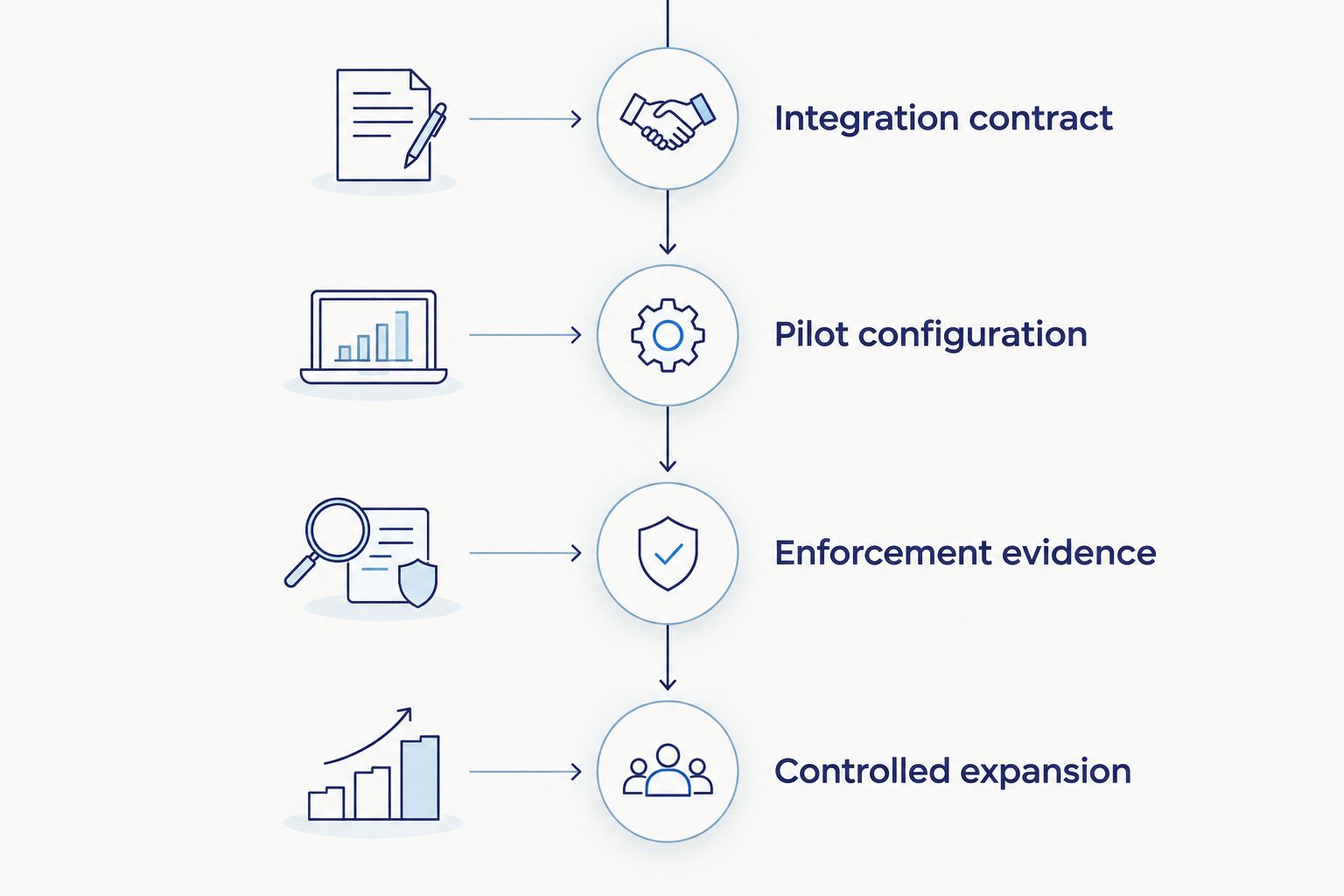
Step 03: Enforcement evidence
Positive and negative tests
- Test a fresh sign-in. End the relevant test sessions using your approved procedure, then start the intended application journey. Confirm that the approved authentication method is required rather than silently satisfied by an earlier session.
- Test password fallback. Attempt the documented alternative sign-in and recovery routes. Record whether a reusable password still grants access where your policy intends to prohibit it.
- Test an unenrolled user. Verify the approved enrollment or denial behavior. The outcome must match the design, not simply permit access through a weaker route.
- Test lost-authenticator recovery. Follow the approved recovery procedure with a designated test identity. Confirm identity verification, authenticator replacement, session handling, and audit evidence.
- Test the scope boundary. Verify that a non-pilot user retains the intended existing behavior. Check users with overlapping group memberships separately.
- Review the event trail. In Okta, use System Log to investigate the matching events. Record the observed authentication and policy outcomes, not just the application's landing page.
Use at least 3 test cases as an initial gate: approved user succeeds, unapproved authentication fails, and controlled recovery succeeds. Add the other cases above before expansion. These are acceptance tests, not performance benchmarks.
Expected result: Evidence shows the intended authentication method, correct policy scope, controlled recovery, and no unintended password fallback in the tested journey.
Rollback and release criteria
Define rollback before enforcement. Record the previous assignments and policy configuration, the authorized change owner, and the conditions that trigger reversal.
Restore the last known working policy rather than improvising a tenant-wide exception. Preserve the event trail for diagnosis. After any correction, repeat both successful-access and denied-access tests; testing only the repaired user's login leaves the security boundary unverified.
Step 04: Controlled expansion
Release by access journey
- Review pilot findings. Separate connection errors, enrollment problems, application compatibility issues, and policy mistakes. Assign an owner to each unresolved issue.
- Approve the next scope. Expand by a defined user group and application journey. Do not combine an organization-wide policy change with unrelated identity cleanup.
- Repeat the evidence tests. Recheck fresh sessions, fallback, recovery, and out-of-scope behavior for each new access pattern. A successful browser journey does not establish that every client behaves identically.
- Retire superseded paths deliberately. Remove old authentication routes only after dependency review and approval. Track service identities and non-interactive access separately from human passwordless enrollment.
Expected result: Each expansion has an owner, a tested boundary, and a reversible change. Your 2026 rollout record identifies remaining password-dependent journeys instead of labeling the entire environment passwordless prematurely.
Variant: Recheck access when group membership changes
Initial enrollment is only one workflow. A second workflow checks whether access remains correct after a user changes role, leaves a pilot group, or exits the organization.
Start with the supported lifecycle capabilities already approved for your environment. Do not assume the authentication connection also synchronizes users, changes group assignments, or revokes existing sessions.
- Define the event: A documented group change, account disablement, or application assignment change starts the review.
- Define the action: Reevaluate the relevant assignment and policy scope through supported administrative or lifecycle mechanisms.
- Verify the outcome: Test a fresh access attempt and inspect the matching records. Evaluate existing sessions separately under your session-management policy.
- Preserve exceptions: Keep emergency access and service identities under their own controls rather than forcing them through a human enrollment workflow.
The benefit is clearer lifecycle enforcement. The trade-off is additional dependency management: identity sources, synchronization timing, application behavior, and session handling must agree with the intended outcome.
Troubleshooting
The application opens without an authentication prompt
An existing session can satisfy access requirements. Repeat the test from the approved fresh-session state, then inspect the matching event. Do not weaken authentication settings merely to make a prompt appear.
The user authenticates but cannot enter the application
Check application assignment and the identity mapping agreed in the integration contract. Compare the authenticated identity with the account expected by the application; successful authentication does not establish authorization.
Password authentication still works
Trace the exact journey that accepted the password. Inspect applicable policy rules, their precedence, group memberships, and alternative entry routes. Correct the specific path and repeat the denied-access test.
Enrollment fails on part of the device fleet
Check the approved authenticator's documented operating-system, browser, device, and management requirements. Route unsupported combinations to the exception process. Do not present an unverified compatibility assumption as a connection defect.
Recovery restores access through a weaker route
Review identity verification and authenticator replacement together. Require the approved recovery checks before re-enrollment, evaluate existing sessions, and verify that recovery does not leave an unintended password-based access path enabled.
Customize your workflow
Keep authentication as the primary control for this deployment. Then connect the outcome to the SecFolio four-layer attack-path framework without treating any layer as a replacement for another:
- External exposure: Discover and close exposed entry points before initial access.
- Passwordless identity: Eliminate reusable credentials from the access journeys covered by the rollout.
- Identity microsegmentation: Contain lateral movement and limit blast radius after an identity or session is compromised.
- Cyber Storage: Preserve data resilience through encryption, sharding, and distribution across independent locations.
Cyber Storage encrypts data before it leaves the customer environment, then distributes immutable encrypted shards so no single location holds a reconstructable file. This creates a logical air gap: attackers targeting an individual storage location encounter unusable fragments rather than complete files. Authorized recovery uses the distributed recovery architecture.
That architecture complements authentication; it does not make compromised sessions harmless or replace exfiltration controls. Validate the recovery design separately from the passwordless pilot.
FAQ
How do I connect SecFolio to Okta for passwordless authentication?
Confirm the supported integration method and deployment-specific instructions first, then configure a scoped pilot. Verify identity mapping, enrollment, application policy, recovery, and authentication events before expanding enforcement.
Does an Okta application connection automatically make sign-in passwordless?
No. Application trust and passwordless authentication are separate configuration concerns. Enrollment, access policy, alternative sign-in routes, and recovery determine whether the tested journey still accepts reusable passwords.
Should I choose SAML or OpenID Connect for this connection?
Use the protocol specified by the supported deployment design. Do not choose a generic federation template or assume protocol support from the products’ general capabilities.
Why does my pilot application open without asking me to authenticate?
An existing session can satisfy the application’s access requirements. Repeat the test from an approved fresh-session state and inspect the matching authentication event before changing policy.
Can I enforce passwordless authentication for everyone immediately?
Use a bounded pilot before organization-wide enforcement. Confirm enrollment, device compatibility, recovery, rule scope, and rollback so an authentication change does not create an uncontrolled lockout.
Does removing a user from a group end an existing session?
Do not treat a group-membership change as proof that an existing session has ended. Verify assignment changes and session behavior separately against the supported lifecycle and session-management controls.
Does passwordless authentication replace segmentation or data resilience?
No. Passwordless authentication addresses reusable credentials; identity microsegmentation contains lateral movement. Cyber Storage provides a separate data-resilience architecture for protected data.
One last thing
Test the route you intend to forbid, not just the route you intend to enable. A successful passwordless login proves that one journey works. A failed password fallback, correctly denied access attempt, and controlled recovery provide the evidence that your 2026 enforcement boundary behaves as intended.


