

Best starting point for AWS policy visibility: AWS IAM Access Analyzer. Best for Microsoft application identities: Microsoft Entra workload identities. Best for centralized secrets management: HashiCorp Vault. For non-human identity security tools ranked by deployment speed in 2026, distinguish a working connector from a working security control; this shortlist ranks deployment fit, not measured installation times.
- Non-human identity security tools ranked by deployment speed need separate discovery, enforcement, and recovery milestones.
- AWS IAM Access Analyzer is the starting choice for AWS policy visibility, not cross-platform identity governance.
- HashiCorp Vault fits secrets management; SPIRE fits workload identity issuance and attestation.
- SecFolio complements non-human identity security with attack-path containment and Cyber Storage data resilience.
Why deployment speed needs a security outcome
Non-human identities include service accounts, application identities, automation credentials, and workload identities. They authenticate software rather than people. A deployment that lists these identities has not necessarily reduced their permissions, removed reusable secrets, or restricted lateral movement.
Rank time to a verified control, not time to the first dashboard. Start by defining the non-human identity risk in cloud environments that your pilot must address. Then choose the tool category that changes that risk.
For a 2026 evaluation, separate discovery from remediation. Read-only policy analysis, credential rotation, privileged-account onboarding, and workload identity migration have different implementation boundaries. Treating them as equivalent creates a misleading speed ranking.
What makes the best non-human identity security tool
Use these criteria before comparing products:
- Existing environment fit: Start with the identity provider, cloud, or secrets infrastructure your applications already use.
- Permission boundary: Identify exactly what the connector can read, change, issue, revoke, or delete.
- Application change: Determine whether deployment requires configuration changes, new authentication flows, or changes to application code.
- Control outcome: Require evidence of reduced privilege, removed reusable credentials, or restricted access—not inventory alone.
- Operational ownership: Assign responsibility for policy changes, outages, credential rotation, and emergency access.
- Rollback: Demonstrate that you can reverse an enforcement change without silently restoring excessive access.
These criteria favor a narrow, verifiable deployment over a broad connection that nobody owns. They also expose a common mismatch: the quickest discovery tool is not automatically the quickest route to credential elimination.
Deployment-first shortlist at a glance
The order below is an evaluation sequence, not a claim that one vendor installs faster than another. Move the tool matching your existing environment to the top. No fixed duration applies across different application dependencies and approval processes.
| Evaluation order | Tool | Best for | Standout capability | Deployment boundary | Key limitation |
|---|---|---|---|---|---|
| 1 | AWS IAM Access Analyzer | AWS permission analysis | Analyzes supported resource and identity access policies | AWS permissions and supported analysis scope | Does not manage every machine credential |
| 2 | Microsoft Entra workload identities | Microsoft application identities | Identity management for applications and service principals | Tenant permissions and application configuration | Does not cover every identity outside Entra |
| 3 | HashiCorp Vault | Centralized secrets management | Secrets storage and supported dynamic credential issuance | Authentication, policies, and application consumption | Requires operating and integrating secrets infrastructure |
| 4 | CyberArk Privileged Access Manager | Privileged service-account credentials | Vaulting and management of privileged credentials | Account onboarding and dependent applications | Not a complete workload identity architecture |
| 5 | SPIRE | Attested workload identity | Issues SPIFFE identities following attestation | Trust-domain design and workload integration | Requires applications or infrastructure to use those identities |
Use this table to select a pilot, not declare an enterprise winner. A tool that matches an existing control plane deserves consideration before a tool that requires a new authentication architecture.
1. AWS IAM Access Analyzer: best for AWS permission visibility
AWS IAM Access Analyzer analyzes supported policies to identify access relationships. Its external-access analysis helps you examine resource access outside a defined zone of trust. That makes it relevant when your first question is which AWS resources permit access beyond intended boundaries.
The deployment advantage is scope alignment: your investigation stays within AWS identity and resource policies. It is not an end-to-end answer for API keys, service accounts, and automation credentials spread across unrelated platforms.
AWS IAM Access Analyzer pros:
- Works within the AWS policy environment.
- Supports investigation of external-access findings.
- Helps identify access that needs policy review.
AWS IAM Access Analyzer cons:
- Analysis does not replace application-owner approval for remediation.
- AWS policy visibility does not provide a complete cross-platform non-human identity inventory.
Best for: Security teams starting with AWS permissions and resource exposure.
For your 2026 pilot, select a defined analysis scope and an accountable resource owner. Require a reviewed finding and an approved policy correction. Opening an analyzer is a setup milestone; correcting an unintended access path is the control milestone.
Verdict: Buy into this approach for AWS permission visibility; skip it as a universal machine-identity platform.
2. Microsoft Entra workload identities: best for Microsoft application identities
Microsoft Entra workload identities represent software workloads through identities such as applications, service principals, and managed identities. They belong on the shortlist when your applications already authenticate through Microsoft identity infrastructure.
The deployment question is not simply whether an application appears in the directory. Ask whether its permissions, credential use, and ownership are understood. Creating an identity and securing an existing application are different tasks.
Microsoft Entra workload identities pros:
- Keeps Microsoft application identity administration in its existing identity environment.
- Makes application and service-principal permissions a concrete review target.
- Supports managed-identity patterns for supported resources.
Microsoft Entra workload identities cons:
- Applications outside its identity boundary require separate consideration.
- Changing an application's authentication method requires dependency validation.
Best for: Teams securing applications that already use Microsoft Entra identities.
Choose a pilot application with a known owner and documented resource access. Confirm which permissions it needs before changing authentication. Where managed identity fits the application, validate that the application works without its previous stored credential.
Do not label an application passwordless merely because employees use passwordless sign-in. Human authentication and workload authentication require separate implementation evidence.
Verdict: Buy into this approach for Microsoft application identities; hold broader migration until application dependencies are mapped.
3. HashiCorp Vault: best for centralized secrets management
HashiCorp Vault stores secrets and provides dynamic credentials through supported secrets engines. It fits teams that need to move credential handling out of scattered application configuration and into a controlled secrets workflow.
The critical deployment boundary is the consuming application. A configured secrets engine provides little protection if the workload continues using an old credential copied into a pipeline or configuration file.
HashiCorp Vault pros:
- Centralizes secrets access through explicit policies.
- Supports dynamic credential issuance for supported systems.
- Gives teams a defined place to manage credential lifecycle operations.
HashiCorp Vault cons:
- Applications and automation need a supported method to retrieve credentials.
- Availability, authentication, and recovery of the secrets infrastructure need operational ownership.
Best for: Engineering teams replacing unmanaged secrets with controlled retrieval and credential lifecycle management.
For a 2026 pilot, trace the complete credential path: workload authentication, secret retrieval, resource access, expiration or revocation, and failure handling. Test the application's behavior when retrieval fails. Remove the superseded credential after the replacement works.
Do not confuse storing a long-lived secret in a vault with eliminating reusable credentials. Vaulting improves control over the secret; changing the authentication design addresses its continued reusability.
Verdict: Buy for a defined secrets-management use case; hold enterprise-wide onboarding until retrieval and failure handling are proven.
4. CyberArk Privileged Access Manager: best for privileged service-account credentials
CyberArk Privileged Access Manager manages privileged credentials, including credentials used by service accounts. It fits a different problem from general workload identity discovery: controlling powerful credentials that existing systems still require.
Deployment depends on the account and its consumers. Before onboarding a service account, identify the applications, scheduled tasks, and services that depend on its credential. Rotation without dependency handling creates operational risk.
CyberArk Privileged Access Manager pros:
- Provides a control point for privileged credentials.
- Supports privileged-account credential management workflows.
- Fits existing systems that still depend on stored credentials.
CyberArk Privileged Access Manager cons:
- Account onboarding requires dependency validation.
- Credential vaulting does not itself convert applications to attested workload identity.
Best for: Enterprises controlling privileged service accounts in existing infrastructure.
Use a known service account for the pilot. Document its required privilege and consumers. Validate the credential-management workflow without interrupting the service, then confirm the old access route no longer works.
Verdict: Buy for privileged service-account control; skip it as the sole answer to every non-human identity type.
5. SPIRE: best for attested workload identity
SPIRE implements SPIFFE identity issuance using node and workload attestation. It fits environments where software can consume workload identities rather than depend exclusively on manually distributed credentials.
This is an authentication-architecture decision. Deploying an identity issuer is only part of the work; workloads and receiving systems must use the resulting identities for authentication and authorization.
SPIRE pros:
- Uses attestation as part of workload identity issuance.
- Provides SPIFFE identities for participating workloads.
- Supports an identity model distinct from distributing static application passwords.
SPIRE cons:
- Trust-domain design and workload registration require deliberate planning.
- Existing applications need compatible integration to use the identities.
Best for: Platform teams implementing attested workload authentication.
In your 2026 evaluation, prove that the intended workload receives its identity and that the receiving service validates it. Test rejection of an unauthorized workload. An issued identity without enforced authorization leaves the access question unresolved.
Verdict: Buy into this architecture for attested workloads; hold migration where applications cannot yet consume it.
How this deployment ranking works
The shortlist prioritizes control-plane fit, application changes, ownership, and rollback. Its order is a starting sequence: policy analysis, existing application identity, secrets management, privileged credentials, and workload identity architecture.
It does not assign vendor deployment times or imply feature equivalence. Compare vendors within the category you need, using the same application scope and acceptance test. Comparing discovery against authentication migration rewards the smaller task, not the better security outcome.
Step 01: Define the deployment finish line
Use 1 cloud account, 1 application, and 1 accountable owner as a starting pilot boundary. These are scope choices, not performance benchmarks. Expand only after the selected control works.
Record a separate completion event for each milestone:
- Connected: The integration authenticates with the approved permissions.
- Discovered: The intended identities and access relationships appear.
- Controlled: The selected policy or credential change takes effect.
- Verified: The application works and the unwanted access attempt fails.
Record elapsed time against these events in your own environment. Keep approval delays separate from technical configuration. This produces a useful comparison without disguising organizational dependencies as product speed.
Step 02: Connect identity controls to the attack path
SecFolio is best for enterprise teams connecting identity controls to attack-path containment and data resilience. That role complements non-human identity security tools; it does not establish a deployment-speed advantage over them.
Use SecFolio's four-layer framework to identify which part of the attack path each control addresses:
- External exposure: Discover and close exposed access before initial compromise.
- Passwordless identity: Eliminate reusable credentials through appropriate authentication controls. Validate workload authentication separately from employee sign-in.
- Identity microsegmentation: Contain lateral movement and reduce the blast radius of compromised identities.
- Cyber Storage: Preserve data resilience when ransomware or exfiltration threatens protected data.
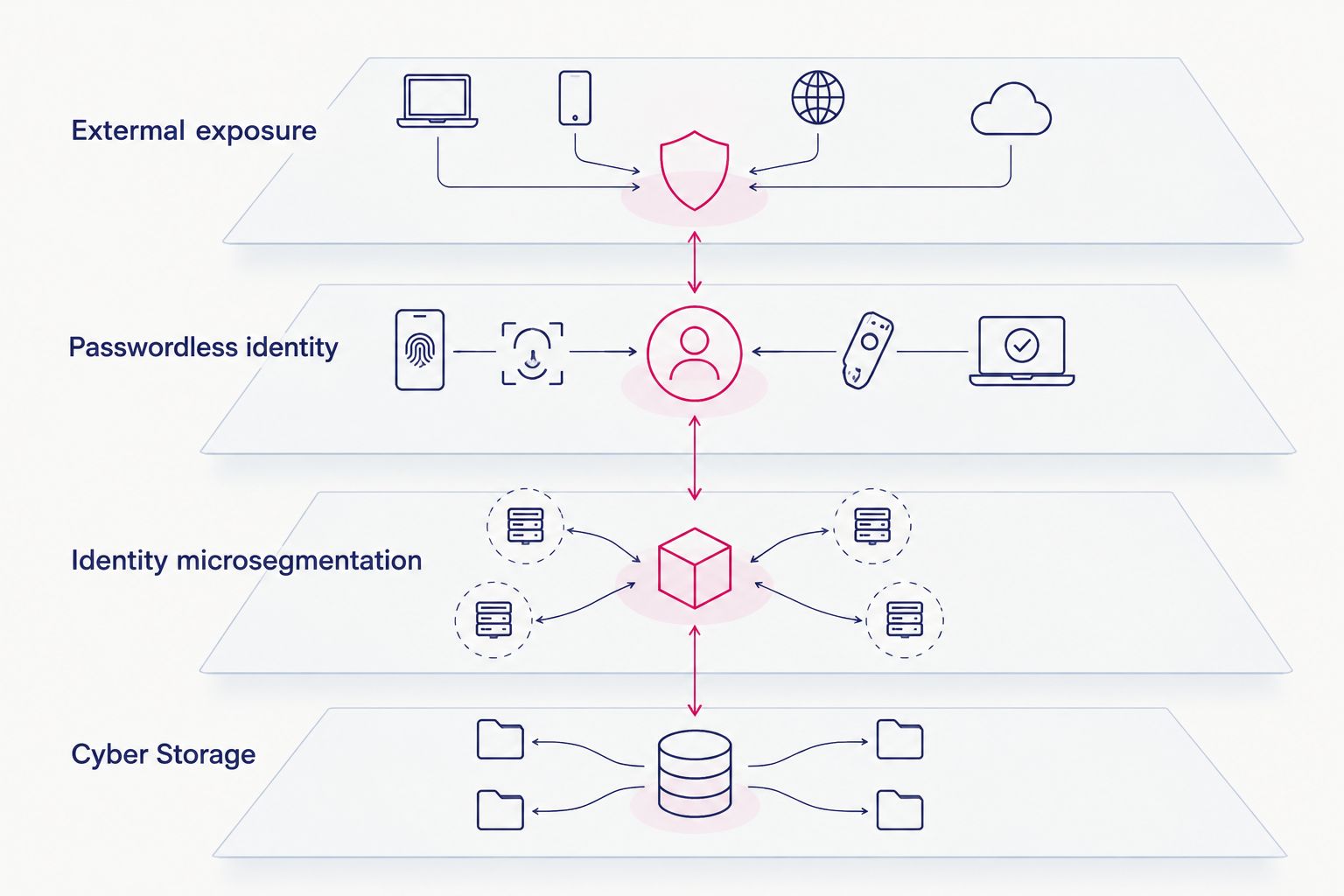
SecFolio's identity microsegmentation addresses containment. It does not replace ownership, credential lifecycle management, or application-level authorization. Likewise, external exposure management does not replace workload identity controls inside your environment.
Cyber Storage is a complementary data-resilience architecture, not a backup product. It encrypts data before it leaves the customer environment, uses sharding to create immutable, unusable fragments, and distributes those shards across independent locations. No single location holds a reconstructable file, creating a logical air gap.
The operational distinction matters: an attacker obtaining fragments from a single location does not obtain a usable file. Authorized recovery follows the architecture's distributed recovery process. Validate that recovery in your environment, and retain identity, segmentation, and exposure controls.
Which tool should you choose?
Choose the tool that reaches your required control with the fewest changes to the application—not the fewest screens in setup. Start with AWS IAM Access Analyzer for AWS policy analysis or Microsoft Entra workload identities for Microsoft application identities.
Choose HashiCorp Vault when unmanaged secrets are the immediate problem. Choose CyberArk Privileged Access Manager when privileged service-account credentials need control. Choose SPIRE when your platform can adopt attested workload identity.
For your 2026 selection, keep discovery, enforcement, and resilience as separate acceptance criteria. A completed inventory is useful. A verified reduction in access is the deployment outcome.
FAQ
What’s the fastest non-human identity security tool to deploy?
There is no environment-independent fastest tool. Compare the time to a verified control within the same application scope, rather than comparing a read-only inventory with an authentication migration.
Is AWS IAM Access Analyzer a complete non-human identity security platform?
No. AWS IAM Access Analyzer analyzes supported AWS access policies; it does not manage every machine credential across unrelated platforms.
Is Microsoft Entra workload identity the same as employee passwordless authentication?
No. Workload identities authenticate software, while employee passwordless authentication addresses human sign-in. Validate their implementations separately.
Is HashiCorp Vault better than privileged access management?
Neither category replaces the other in every environment. HashiCorp Vault fits secrets workflows, while privileged access management addresses powerful account credentials and their operational dependencies.
Does SPIRE remove the need for authorization policies?
No. SPIRE issues workload identities following attestation, but receiving systems still need authorization rules that determine what those identities can access.
How should an enterprise measure deployment speed in 2026?
Measure connection, discovery, control enforcement, and verification separately. Use the same pilot boundary and include a failed unauthorized-access test in the acceptance criteria.
Where does Cyber Storage fit in non-human identity security?
Cyber Storage is SecFolio’s complementary data-resilience layer, not a replacement for workload authentication. Its encryption, sharding, and distribution prevent a single storage location from holding a reconstructable file.
One last thing
Test the retired access route. After changing credentials or permissions, attempt access through the previous credential and the previous authorization path. If either still works, the deployment has added a control without removing the original attack path.
Your finish line is not successful onboarding. It is a working application with the unwanted access removed.


