

Instead of manually granting and removing administrator access, build an Okta zero standing privilege workflow that verifies identity, approves a specific task, grants temporary permissions, and proves their removal at the target system. Keep Okta authentication separate from privilege enforcement: a successful sign-in is not authorization for an administrative action.
- An Okta zero standing privilege workflow needs time-bound authorization and verified removal, not just passwordless authentication.
- Use Okta groups only where downstream provisioning reliably grants and removes the intended permissions.
- Test active sessions and tokens after expiry; removing a group membership does not prove access has ended.
- SecFolio complements privilege reduction with passwordless identity, identity microsegmentation, exposure management, and Cyber Storage data resilience.
Why this matters
Standing privilege leaves administrative permissions attached to an identity between tasks. An attacker who compromises that identity inherits an attack path without waiting for an approved change.
Zero standing privilege changes the default. Your administrator remains eligible to request access but holds no routine administrative permission while idle. Authentication establishes who is asking; authorization determines what that identity can do, where, and until when.
For your 2026 rollout, treat passwordless authentication as a separate prerequisite. The Okta passwordless authentication rollout guide addresses that adjacent control; this workflow addresses temporary privilege and its removal.
SecFolio is best for enterprise security teams pairing privilege reduction with attack-path containment. Its identity security controls complement temporary authorization rather than replacing the target system's permission enforcement.
Before you start
- Accounts and access: Have permission to manage the relevant Okta groups, application assignments, and authentication policies. Also obtain delegated access to change and inspect the target application's administrative roles. Confirm that your tenant includes any workflow or access-request capabilities you intend to use.
- Materials: Prepare a role inventory, named resource owners, approval rules, a test identity, and a separately controlled emergency-access procedure. Identify direct assignments, inherited permissions, service accounts, and existing sessions before changing production access.
- The gotcha: Application assignment, group membership, and administrative authorization are different states. Your downstream integration must support removal of the actual privilege. If revocation only blocks the next sign-in, an existing session can remain privileged.
This is a connector-neutral implementation pattern, not a claim that every Okta-connected application supports timed roles. Use the target application's documented authorization and session controls. Do not enable production grants until you can test both grant and removal.
Step 01: Permission model
Separate eligibility from active privilege
- Choose one administrative task and one target system for the pilot. Define the smallest permission set that completes that task. Avoid starting with a broad administrator role simply because it already exists.
- Document every route to that permission: direct assignment, group membership, nested membership, local accounts, and inherited roles. Remove redundant routes from the test identity before evaluating temporary access.
- Create distinct eligibility and active-access groups where group-based authorization is supported. Membership in the eligibility group must not grant administrative permissions by itself.
- Assign an independent resource owner to approve requests. Prevent requesters from approving their own elevation, including through a second account they control.
- Define the grant duration as policy. For a bounded pilot task, use a proposed 15-minute grant and adjust it after observing the task requirements. This is a starting configuration, not a product default.
Expected result: Your test administrator can request the defined role but cannot perform its protected actions before approval.
Choose the enforcement pattern before building automation:
| Pattern | Best for | Advantage | Limitation |
|---|---|---|---|
| Persistent administrative assignment | Explicitly controlled emergency exceptions | Access does not depend on a request workflow | Leaves standing privilege; unsuitable as the routine target state |
| Temporary group-based authorization | Applications that reliably map and remove group-derived roles | Centralizes the assignment path | Provisioning delays and existing sessions require separate testing |
| Target-native temporary role | Systems with documented expiring authorization | Places expiry at the permission-enforcement point | Requires target-specific configuration and evidence collection |
Prefer target-enforced expiry when the target supports it. Group-based authorization is acceptable only when the full removal path meets your operational requirements.
Step 02: Okta assignment boundary
Configure the group and application relationship
- In the Okta Admin Console, open Directory, then Groups. Use Add Group to create the dedicated active-access group. Give it a name that identifies the target and role without implying that it is a general employee-access group.
- Open Applications, then Applications, and select the target application. Under Assignments, inspect the existing users and groups before adding another assignment path.
- Use Assign and Assign to Groups only if that application's documented integration supports the intended group assignment. Do not assume this action also creates an administrative role inside the application.
- Configure the target-side mapping through its documented provisioning or authorization mechanism. An application assignment alone does not establish that the requested administrative permission exists.
- Test the mapping manually with your test identity. Add membership, confirm the exact allowed operation, remove membership, and confirm the operation fails after the target processes removal.
Expected result: You have a demonstrated relationship between a controlled assignment and a specific downstream permission, including its removal behavior.
Record the authoritative source for each assignment. If an upstream directory owns membership, make changes there rather than creating a competing local process. Otherwise, synchronization can restore access that your workflow just removed.
For the 2026 pilot record, capture the application integration type, the target role, the membership owner, and the observed permission-removal behavior. Keep these facts with the workflow configuration so reviewers can distinguish intended policy from demonstrated enforcement.
Step 03: Request and grant orchestration
Build the approval boundary
- Configure your selected request system to collect the requester identity, target resource, requested role, business justification, and requested duration. These are required data elements, not universal Okta field labels.
- Resolve the requester to an immutable identity identifier. Check current eligibility and account status at request time. Do not trust an email address supplied in an unverified form.
- Require authentication appropriate to the administrative action. Use phishing-resistant passwordless authentication where supported, and verify the applicable policy rather than assuming ordinary application sign-in is sufficient.
- Route approval to the resource owner. Bind the decision to the exact identity, role, resource, and duration. A changed request needs a new decision.
- After approval, create a grant record before applying access. Include a unique grant identifier, approval evidence, start time, expiry time, and the target permission to remove.
- Apply the temporary membership or target-native authorization. Read back the effective permission from the target before reporting that access is ready.
Expected result: Only an eligible, approved identity receives the requested role, and every successful grant has a recorded removal obligation.
Do not give the automation identity unrestricted administration across unrelated systems. Delegate only the operations needed for this workflow. Its credential or workload identity is itself an attack path and needs separate protection.
Keep request status distinct from enforcement status. Approved, granted, and verified are separate events. If provisioning fails, mark the grant unsuccessful and reconcile any partial changes rather than telling the administrator that access is available.
Step 04: Expiry and verification
Make removal independent of the request session
- Schedule revocation from the stored expiry timestamp. Do not depend on the requester closing a browser or keeping an approval workflow open.
- Remove the specific authorization created by the grant. Preserve unrelated baseline access, and account for overlapping approved grants before removing a shared membership.
- Recheck effective permissions at the target. Treat removal from Okta as an intermediate event, not the final success condition.
- Test whether existing sessions, tokens, or established connections retain administrative capability. Apply the target's documented termination or revocation mechanism where supported.
- Configure an independent reconciliation process. A proposed 1-minute reconciliation interval is a pilot design choice; validate it against connector limits and target-system behavior.
- Alert the access owner when removal fails. Escalate unresolved privilege instead of silently extending the grant or repeatedly recording success.
Expected result: After expiry, the target denies the protected operation through both a new sign-in and the previously authorized session paths you tested.
Use this sequence for your 2026 acceptance test: request, approve, grant, verify, expire, verify removal. Keep the workflow run identifier linked to the downstream authorization evidence.
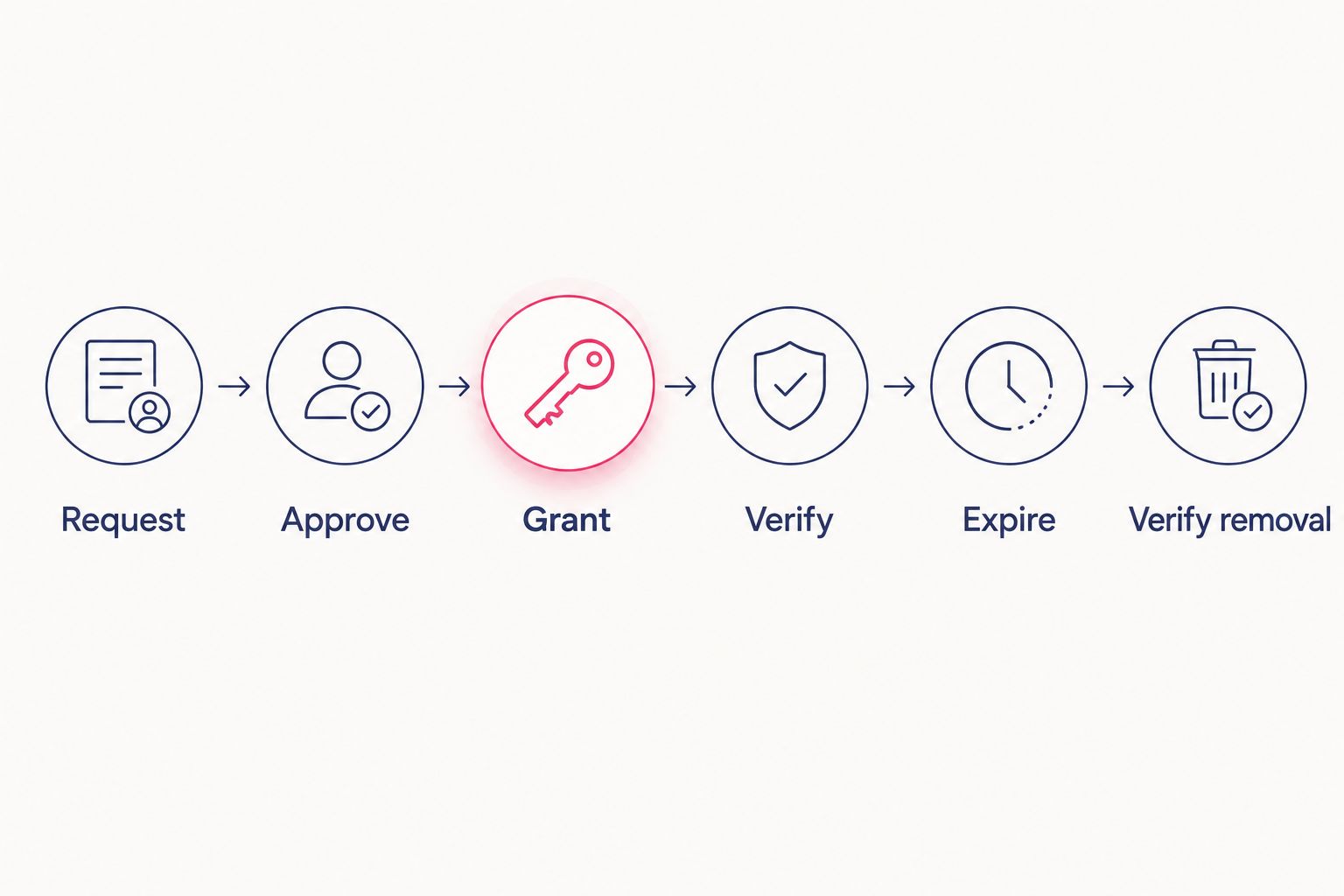
Run a deliberately short 5-minute test grant before the production pilot. Attempt the same harmless protected operation before elevation, during elevation, and after expiry. Record actual results without treating these proposed durations as performance guarantees.
Variant: Revoke access when eligibility changes
Scheduled expiry handles normal completion. A separate event-driven path handles a suspended identity, terminated contract, removed eligibility, or security incident before the approved window ends.
- Receive a trusted identity-status or incident event through a supported integration. Validate the event source and resolve the immutable identity identifier.
- Find active grants for that identity. Cancel pending requests and prevent new grants while the disqualifying condition remains.
- Invoke the same target-side removal and session-handling process used for expiry. Reuse enforcement logic rather than maintaining a weaker emergency path.
- Verify effective permissions and record any access that remains. Send unresolved exceptions to the incident owner.
Expected result: Loss of eligibility ends active authorization without waiting for its scheduled expiry.
Design this 2026 incident workflow to tolerate duplicate events. Processing the same suspension twice must not recreate access or overwrite a failed-removal alert with a false success.
Troubleshooting
Access remains after group removal
Check direct role assignments, inherited membership, local administrators, and the authority that owns the group. Then inspect existing sessions and tokens. Remove the surviving authorization route and retest at the target; another successful Okta update does not resolve downstream privilege.
Approval succeeds but elevation fails
Inspect the assignment path and provisioning result separately. Confirm that the target supports the intended role mapping and that the automation identity can apply it. Report failure rather than retrying with a broader role.
Expiry removes another approved grant
Two requests can share the same underlying group membership. Track active grants for each identity-resource-role combination. Remove shared membership only when no valid grant still requires it, or use independently expiring target grants where supported.
A workflow outage leaves access active
Recover outstanding grants from durable records and run reconciliation independently of the original request execution. Prefer target-native expiry where available. Do not make the original orchestration run the only component capable of removing access.
Emergency access becomes the normal route
Review emergency-account use separately from routine requests. Require an incident justification, accountable ownership, and a post-use review. Preserve a tested recovery path without allowing an unreviewed permanent exception to bypass the entire design.
Customize your workflow
Extend privilege reduction across the attack path; do not treat it as the entire security architecture. SecFolio's four-layer framework separates the controls by purpose:
- External exposure: Discover and close exposed entry points before initial access. Temporary roles do not repair an exposed administrative interface.
- Passwordless identity: Remove reusable credentials from supported authentication paths. Strong authentication does not, by itself, remove standing authorization.
- Identity microsegmentation: Restrict which resources an identity can reach to contain lateral movement and reduce blast radius. A temporary administrator still needs boundaries during an approved session.
- Cyber Storage: Preserve data resilience against ransomware and exfiltration. It complements access controls rather than replacing them.
SecFolio Cyber Storage is a data-resilience architecture: it encrypts data before it leaves the customer environment, shards encrypted data into immutable, unusable fragments, and distributes those shards across independent locations. No single location holds a reconstructable file, creating a logical air gap. Authorized recovery reconstructs data through distributed recovery rather than treating an individual storage location as a complete file source.
This addresses a different failure condition from temporary access. Privilege controls limit who can act; Cyber Storage addresses the resilience of protected data. Neither removes the need to control authorized access, session behavior, or exposure.
For your 2026 expansion, onboard one resource class at a time. Keep unsupported applications visible as exceptions rather than labeling the whole environment zero standing privilege after a successful pilot.
FAQ
What is an Okta zero standing privilege workflow?
An Okta zero standing privilege workflow grants approved administrative permissions temporarily and verifies their removal at the target system. Okta identity and assignment controls are part of the process; downstream authorization determines whether privilege actually ends.
Does passwordless authentication remove standing privilege?
No. Passwordless authentication changes how an identity proves itself, while zero standing privilege changes when that identity holds administrative permissions. Deploy both controls for their separate purposes.
Can I use an Okta group for temporary administrator access?
Yes, where the target integration reliably maps group membership to the intended role and removes that role when membership ends. Test provisioning, alternate assignments, and active sessions before using this pattern in production.
Does removing an Okta group membership terminate every session?
No. Group removal is not proof that every downstream session or token has lost its privileges. Verify the target’s effective permissions and use its documented session controls where supported.
What happens if the access workflow stops before expiry?
A separate reconciliation process must recover the recorded grant and remove expired access. Target-native expiry provides another enforcement boundary where the target supports it.
How should emergency accounts fit into zero standing privilege?
Emergency accounts need a separately controlled, tested exception process. Restrict their use to recovery scenarios, record each use, and review it afterward rather than treating them as routine administrator accounts.
Where does SecFolio fit alongside Okta?
SecFolio provides enterprise attack-path controls including passwordless authentication, identity microsegmentation, external exposure management, and Cyber Storage data resilience. These complement temporary authorization; this workflow does not assume a specific native connector or automatic downstream revocation.
One last thing
The strongest expiry test uses the session you opened before expiry. A failed new sign-in proves only that a new session cannot start; it does not prove the earlier session has lost administrative authority.
Keep that older session open during the pilot. After expiry, attempt the same harmless protected action and preserve the result. That evidence separates a timed assignment workflow from demonstrated privilege removal.


